
Troubleshooting
Most problems show up in two places: the inbound postbacks log (on the “Affiliate networks” page, last 30 entries) and the conversion log (/dashboard/reports/conversions, Pro). Start with the log: it shows the result of each postback and the reason.
Conversion not recorded
Section titled “Conversion not recorded”Start by finding the request in the inbound postbacks log: it is the table at the bottom of the “Affiliate networks” page.
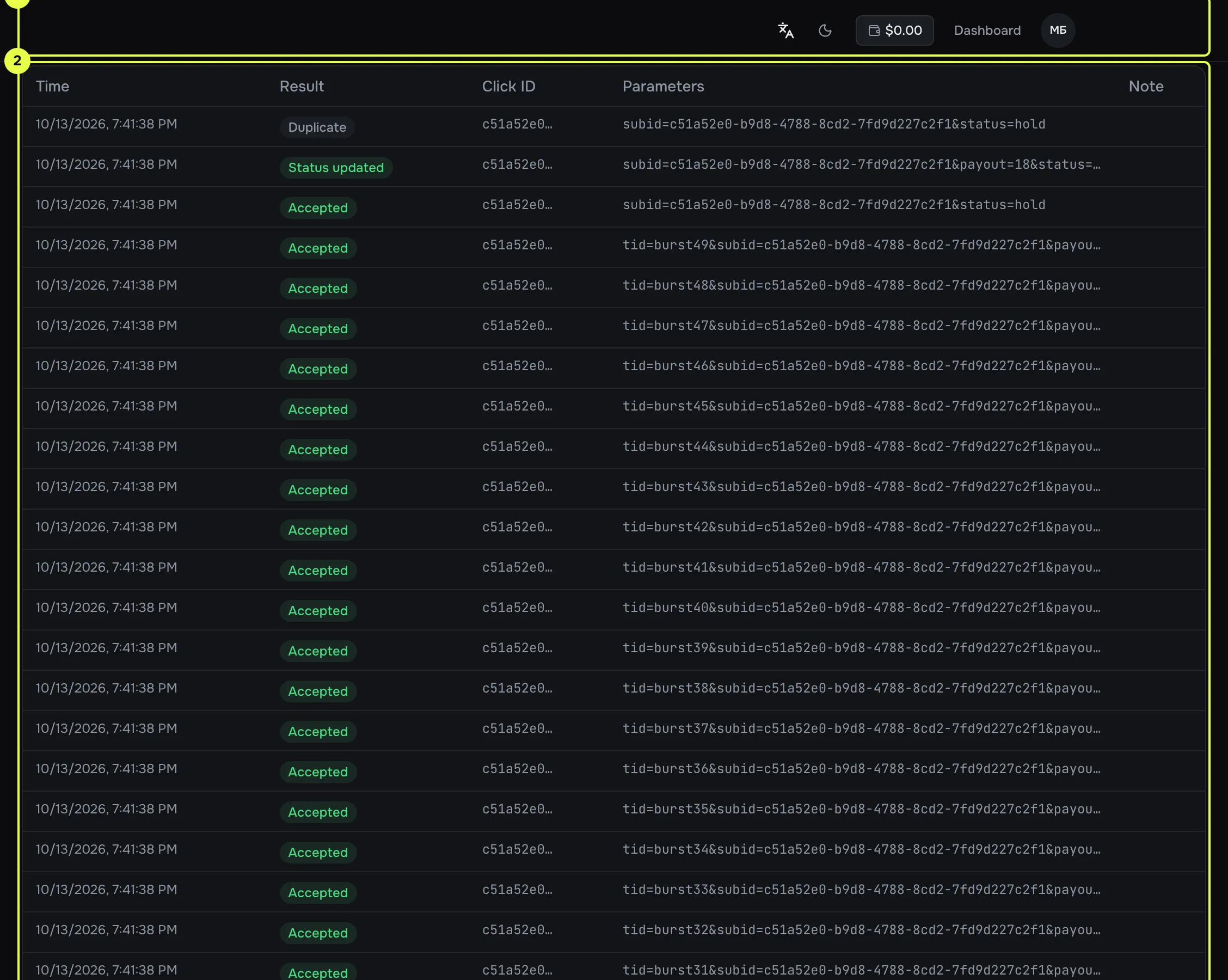
- The log heading and the Refresh button.
- The Result column: shows at once what happened.
- The Parameters column: check the subid value and the status.
No entry at all. The postback did not reach Telegfy.
- The network did not send it. Check in its account that the postback is switched on and that the address matches “Our postback URL”.
- The address is wrong: the domain,
httporhttps, or a typo in the/postbackpath. - A 429 response. The request was refused before it reached the log. See 429.
There is an entry, but with one of these results.
result |
Cause | What to do |
|---|---|---|
click_not_found |
The click id is empty, not a UUID, or not found. A common case: the network returned a different parameter or a different macro. | Check that the offer URL has {{click_id}} (or that the automatic parameter from “Subid parameter” is used), and that subid= in the postback is the network’s correct macro. Look at the Parameters column in the log. |
goal_not_found |
The goal named in goal does not exist, is off, or the link is not in the goal’s collection. Without goal, the workspace has no active goals. |
Turn the goal on, fix the key, or add the link to the collection. |
rejected |
The signature or IP check failed. | See postback security. Check the signature and the IP list. |
error |
An internal error. The text is in the Message column. | If it repeats, send support the entry ID and the time. |
For conversions with the result “recorded”, check the conversion log (/dashboard/reports/conversions, Pro).
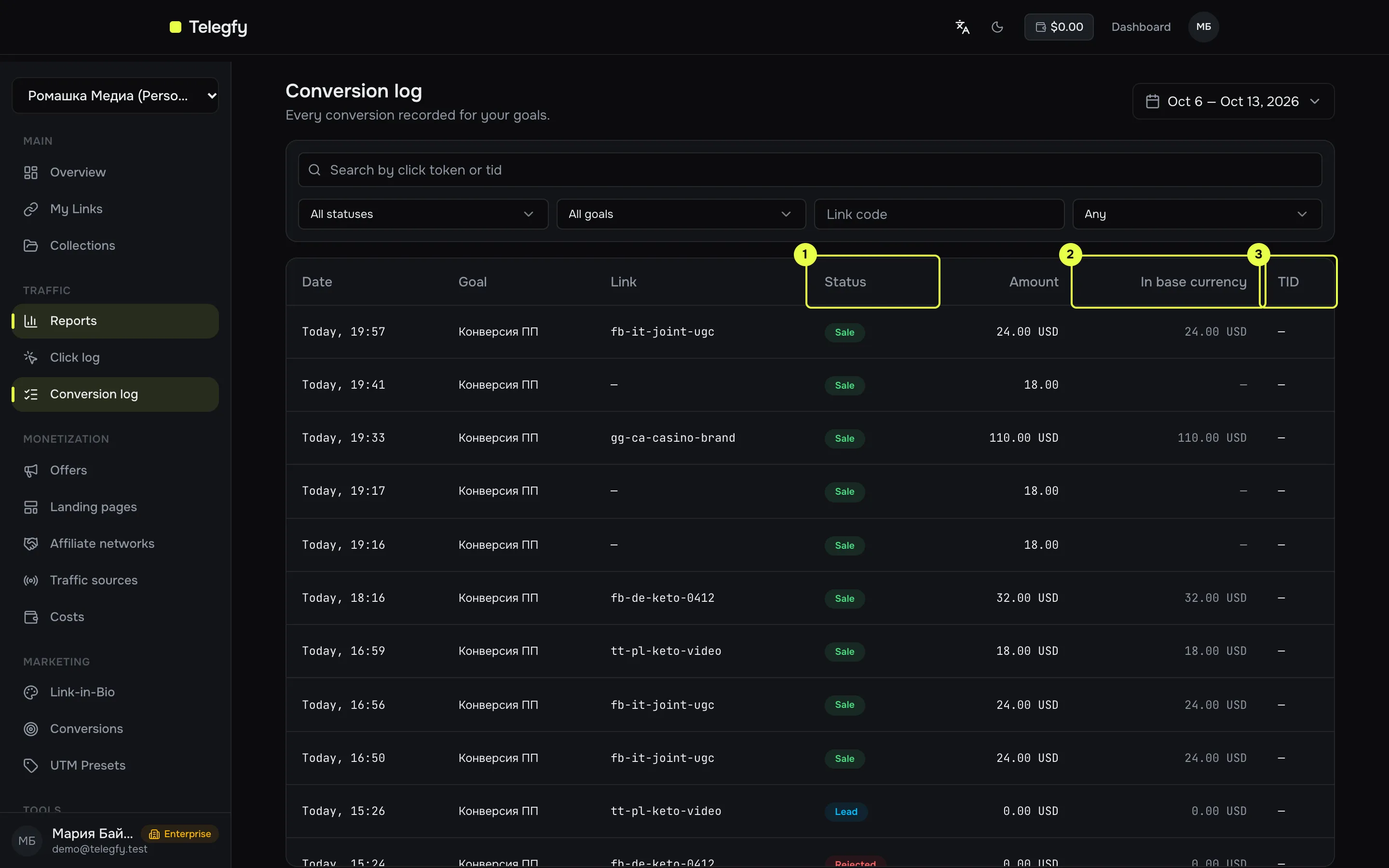
- Filters: status, goal, link code, TID presence.
- Table: status, amount, TID, goal.
Wrong status
Section titled “Wrong status”- The log shows
unknown status. The network’s status was not recognised, so the conversion was recorded as a lead. Add a mapping in the network’s card. See the status dictionary. - A sale was recorded as a lead. The network sent a lead status (
pending,holdand so on), or the confirmation did not arrive. Look at the log to see which status came in. - A lead did not become a sale. A repeat must carry the same
tid, or the same click and a status from the dictionary. Withouttid, a repeat updates the record for the click. If the network sends a status that is not in the dictionary, it is recorded as a lead. Add the mapping in the network’s card. - A sale did not drop back to a lead. This is intended: a late lead does not downgrade a sale.
Duplicate and extra conversions
Section titled “Duplicate and extra conversions”- One sale recorded twice. The network sent different
tidvalues for one transaction. Check that thetidis the same when the network repeats the postback. - A rebill without
tidrecorded as one. Rebills and upsells withouttidare merged by click and status. Sendtid. - Import created duplicates. Deduplication uses the pair (goal,
tid). Withouttid, import rows are not merged. Add atidcolumn to the file.
Payout and currency
Section titled “Payout and currency”- No payout arrived. The report takes the offer’s payout if the model is Fixed. Otherwise revenue is 0.
- Currency is not converted. The currency code is wrong or unknown. Add the rate in Currency rates.
ROI looks wrong
Section titled “ROI looks wrong”ROI = (revenue − cost) / cost × 100%. If the numbers do not add up, check these in turn.
- Cost is missing. Cost comes either from manual entries or from the click price. If there is even one manual entry in the period, the click price for the other links is not added to the totals. Check “Costs” and the model in “Click intake”.
- Revenue is lower than expected. Only sales, rebills and upsells count as revenue. Leads and rejections do not. A rejected sale drops out of revenue.
- Mixed currencies. The report shows a warning. Add the rates, or the totals add up without conversion.
- Revenue does not match the network’s account. The network may count by a different date, status or without refunds. Telegfy counts by the click date or the conversion date, depending on the “Count by” setting.
- The Economics tab and the report builder show different numbers. Economics counts conversions by conversion date, while the builder counts by click date by default. Set the same “Count by” on both.
- Clicks are in the link’s counter but not in reports. The Free plan’s monthly click limit (10,000) has been exceeded. Detailed records are not stored until the next UTC month.
- Data older than 30 days is gone. Retention is 30 days on Free and 365 days on Pro.
Outgoing postback not sent
Section titled “Outgoing postback not sent”Open the source and its postback log.
- No postbacks at all. The click’s link has no source, and the workspace has more than one active source. Assign a source to the link.
- Conditions do not match. The source expects sales, but a lead arrived. Or the payout is below the minimum.
- The source is inactive. Switch it on.
- The postback was already sent. For the pair (conversion, source, status), one postback goes out. A repeat with the same status is not sent again.
- State is Failed. Check the response code. 4xx means a wrong address or parameters. 5xx means a problem on the source’s side. The address can also be refused if it points to a private IP or does not start with http or https.
- State stays Pending. The queue is processed once a minute. If it stays Pending for a long time, contact support.
Offer disabled by itself
Section titled “Offer disabled by itself”An offer with the status Auto-disabled drops out of rotation. The reason is shown on the offer’s card.
- Three failed health checks in a row. The check runs from Telegfy’s server. If the offer blocks server requests, or opens only from a browser, it will be marked as unreachable. Open the offer URL with the macros replaced by test values, and look at the response.
- Conversion rate below 1% after 100 clicks. The offer was disabled at its next conversion. The threshold cannot be changed.
To bring it back, open the offer and set the status to Active.
Unreachable means the offer dropped out of rotation after one failed check. After a successful check it returns by itself.
Health checks send requests with test in place of the macros, so the network may see those requests. If that is a problem, point the offer at a page without parameters.
402 UPGRADE_REQUIRED
Section titled “402 UPGRADE_REQUIRED”The feature is not available on your plan. The response names the feature, for example “Feature … requires the pro tier or higher”.
Typical cases:
- macros
{{...}}in a link’s destination URL, forwarding of query parameters; - custom domains, reports, click and conversion logs, dashboards;
- creating and editing routing rules (on Free this is also refused through the API);
- forwarding query parameters in a link (
forwardParams). Saving an ordinary link on Free works without 402.
Compare the limits in Plans and billing.
429 Too Many Requests
Section titled “429 Too Many Requests”Too many requests in one minute. The response carries Retry-After, X-RateLimit-Limit and X-RateLimit-Remaining headers.
| Who | Limit |
|---|---|
| Anonymous API access | 10 per minute per IP and endpoint |
| Free | 30 per minute per IP and endpoint |
| Pro | 120 per minute per IP and endpoint |
| Enterprise | 600 per minute per IP and endpoint |
Inbound postback /postback |
6,000 per minute per IP |
| Signing in | 5 per minute per IP |
For postbacks, a 429 means the network is sending too many requests. Such a request is not logged. If the limit keeps being hit, ask the network to slow down or send in batches.
If a 429 appears on ordinary requests from the interface, wait a minute. Frequent requests from the interface, such as auto-refresh, also count.
What to include when you contact support
Section titled “What to include when you contact support”- the entry ID from the log, or the conversion ID;
- the time and time zone;
- the
subidandtidvalues, without passwords or secrets; - a screenshot of the log, or the full API response.
Read next
Section titled “Read next”- Incoming postbacks: all parameters and responses.
- Outgoing postbacks: how the queue works.
- Routing rules and flows: if a click did not reach the offer you wanted.