
Goals
A goal is a conversion type with a clear key. For example, “Purchase” with the key purchase, “Upsell” with upsell, or “Registration” with reg. One network can send several goals, and each goal is counted separately.
Open “Conversions” (/dashboard/conversion-goals). At the top of the “Goals” tab is the shared postback URL. Each goal card has a copy button for that goal’s URL, which contains goal=<key>.
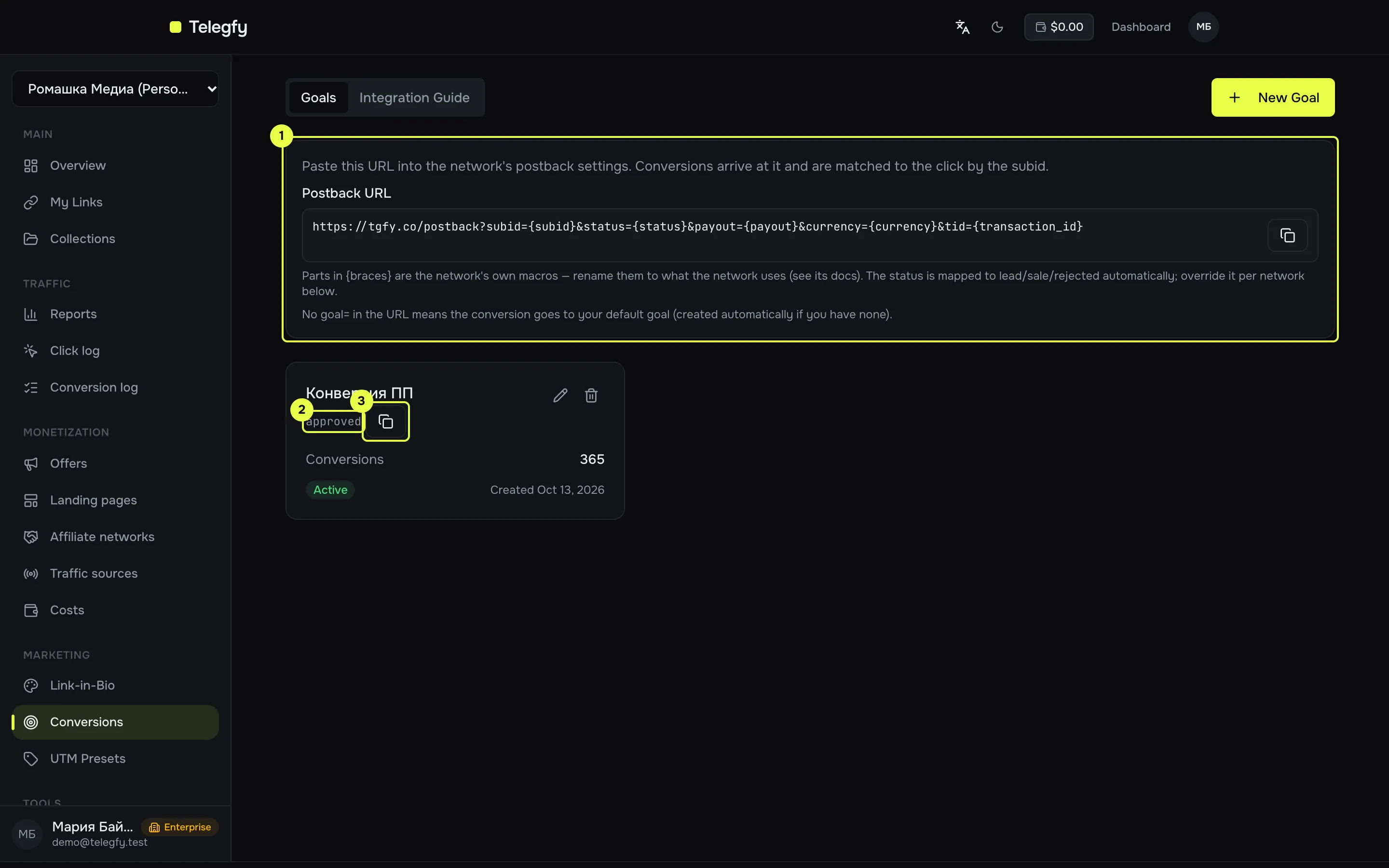
- Shared postback URL, without the
goalparameter. - The goal’s key.
- The copy button for this goal’s postback URL (with
goal=<key>). The “Integration Guide” tab explains how to install the tracker on a site.
Create a goal
Section titled “Create a goal”| Field | What to enter |
|---|---|
| Name | Up to 100 characters, for you |
| Key | 3 to 50 characters: lowercase Latin letters, digits, - and _. This is the value sent in the postback. |
| Description | Optional |
| Scope | “Global (all links)” or a specific collection. A collection limits the goal to the links in it. |
The key is unique within the workspace. If you change the key of an existing goal, postbacks that use the old key will no longer find it.
How a goal reaches a postback
Section titled “How a goal reaches a postback”The goal key is sent in the goal parameter:
https://<domain>/postback?subid={subid}&status={status}&payout={payout}¤cy={currency}&tid={transaction_id}&goal=upsellWithout a goal parameter, the conversion goes to the first active goal of the workspace (the oldest one). If there are no goals at all, Telegfy creates a goal with the key conversion.
Use goal when the network has different events: a purchase and an upsell, or a registration and a deposit. That way they land in separate goals and do not merge.
Deleting a goal
Section titled “Deleting a goal”Deleting a goal deletes all of its conversions. This cannot be undone. If you may need the goal later, turn it off instead. An inactive goal does not accept conversions.
Limits by plan
Section titled “Limits by plan”| Plan | Goals |
|---|---|
| Free | 1 |
| Pro | 20 |
| Enterprise | No limit |
If no goal exists yet, the first postback without goal creates one called conversion. On Free that is the only goal. It is better to create the goal yourself with the key you want.
Statuses
Section titled “Statuses”A status describes the state of a conversion. It can change: a lead becomes a sale, and a sale can become a rejection.
| Status | When it is set | Counts as revenue |
|---|---|---|
lead (Lead) |
A sign-up, or waiting for confirmation | No |
sale (Sale) |
A confirmed payment | Yes |
rejected (Rejected) |
A refund, fraud, cancellation | No |
rebill (Rebill) |
A repeat payment on a subscription | Yes |
upsell (Upsell) |
An extra purchase | Yes |
The network’s statuses are mapped to ours through the dictionary. See Networks and offers.
Tracker on your site
Section titled “Tracker on your site”If your own site records conversions, rather than the network, install the tracker. The script is loaded from your Telegfy domain:
<script src="https://<domain>/tracker/v1.js"></script>Call it from code:
la.track('purchase', { revenue: 25.5, currency: 'USD' });The attribute data-la-goal="purchase" on an element also sends a conversion. The tracker takes the click id from the _la_ct parameter in the address, from localStorage or from a cookie. The tracker does not send a status or tid, so every call creates a new conversion with the status “Lead”. For deduplication, send tid through the API.
Common mistakes
Section titled “Common mistakes”- The key does not match. The postback has
goal=Upsellbut the goal isupsell. Keys are case-sensitive. - The goal is off. The postback returns
goal_not_found. Turn the goal on or fix the key. - The collection. The link is not in the goal’s collection. See above.
Read next
Section titled “Read next”- Incoming postbacks: postback parameters and responses.
- Importing conversions: loading conversions into a goal.