
Reports
The report builder answers the question every buyer asks daily: keep the offer or kill it. It counts clicks, conversions, revenue, cost and ROI for any period, grouped by up to five levels.
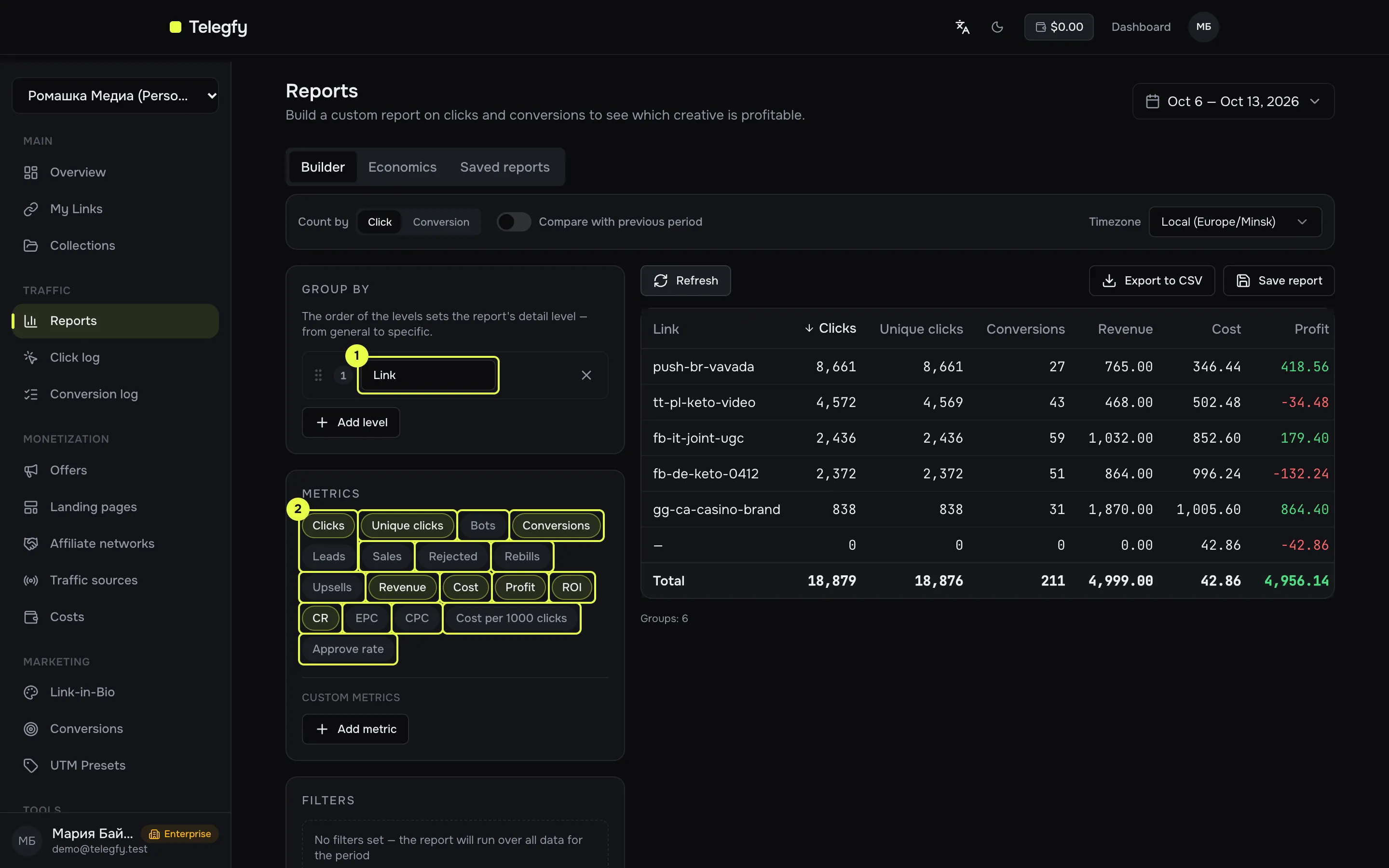
- Grouping — table levels. Order sets the detail: general first, specific last.
- Metrics — metric chips, built-in or custom formulas.
Request settings
Section titled “Request settings”| Setting | What it does |
|---|---|
| Period | Any date range. Default: last 7 days. |
| Count by | Click (default): a conversion belongs to the click’s period. Conversion: a conversion belongs to the day it was recorded. |
| Timezone | Local (from your profile) or UTC. Date buckets use the chosen zone. |
| Group by | Up to 5 levels. |
| Filters | Up to 20 conditions, see below. |
| Compare with previous period | The previous period of equal length, directly before the current one. Totals are compared, delta in %. |
Metrics and formulas
Section titled “Metrics and formulas”Values are rounded to two decimals. Revenue and cost are converted to the base currency (USD by default), see the currency section.
| Metric | What it counts | Formula |
|---|---|---|
| Clicks | All clicks, including bots and repeats | count |
| Unique clicks | Clicks flagged as unique | count |
| Bots | Clicks flagged as bot | count |
| Conversions | All conversions, including rejected |
count |
| Leads | Conversions in status lead |
count |
| Sales | Conversions in status sale |
count |
| Rejected | Conversions in status rejected |
count |
| Rebills | Status rebill |
count |
| Upsells | Status upsell |
count |
| Revenue | Payouts of sale, rebill, upsell conversions |
sum, in base currency |
| Cost | Manual costs if present, otherwise the auto per-click cost | see Cost |
| Profit | Revenue minus cost | Revenue − Cost |
| ROI | Profit relative to cost | Profit / Cost × 100%, empty when cost is 0 |
| CR | Share of clicks that became a lead or a sale | (Leads + Sales) / Clicks × 100% |
| EPC | Revenue per click | Revenue / Clicks |
| CPC | Cost per click | Cost / Clicks |
| Cost per 1000 clicks | Cost of a thousand clicks | Cost / Clicks × 1000 |
| Approve rate | Share of approved among closed | Sales / (Sales + Rejected) × 100% |
Custom metrics
Section titled “Custom metrics”A formula with + − * /, parentheses and unary minus, for example revenue - cost or (sales / clicks) * 100. A name cannot clash with a built-in metric. You can reference custom metrics defined above. Division by zero gives an empty value.
Grouping dimensions
Section titled “Grouping dimensions”| Group | Dimensions |
|---|---|
| Time | Date, hour, week, month |
| Traffic | Link, offer, landing, network, traffic source |
| Audience | Country, city, device, OS, browser, language, referrer, bot |
| Parameters | Sub ID — enter the parameter name: sub_id_1 … sub_id_30 |
Offer, landing and network come from the offer the click was routed to. Traffic source comes from the field on the link.
Filters
Section titled “Filters”You can filter on every dimension except dates. Offer, landing, network and traffic source use dropdowns. Links use a search by code or name. Operators: equals, not equals, is any of, is none of.
There are two cost sources. They describe the same money, so they never add up:
- Auto per-click cost. Set in Click intake (
/dashboard/settings/click-settings): none, a fixed cost per click (CPC), per 1000 clicks (CPM), or a value from a URL parameter. It is written at click time and is not recalculated when settings change. - Manual costs from the Costs section. If a group has a manual amount, that amount is used and the auto cost for that group is ignored.
- A record is spread evenly over the days of its period. For example 300 USD over 30 days is 10 USD per day. Only the part that falls in the report period is counted.
- In the totals row, manual cost is the sum of all workspace records for the period, ignoring filters.
Currency
Section titled “Currency”Revenue and manual costs are converted to the base currency (FX_BASE_CURRENCY, USD by default) at the rate of the day of the conversion or record. Rates are set in FX rates. If no rate exists for that day, the amount stays in its original currency and the report shows a “mixed currencies” warning. Totals are then imprecise.
CSV export
Section titled “CSV export”“Export to CSV” exports only the current page of the table (100 rows by default). To export everything, page through or narrow the period. The file is named report-YYYY-MM-DD.csv. Export needs Pro or higher.
Saved reports
Section titled “Saved reports”- The Saved reports tab stores the whole request, including absolute dates. A “Top offers this week” saved last week still shows last week next week. Re-save regular reports with a fresh period.
- Saved reports are shared across the workspace. Any member except a viewer can save and delete them. Viewers can build and export reports but cannot save.
- Turn on “Public link” to open a report without signing in at
/shared/report/<token>. Turning it off deletes the token.
A public report runs with the author’s permissions: if the author has hidden financials or is limited to their own links or collections, the public version shows exactly the same. If the author has left the workspace or been removed, the public link returns 404.
Economics tab
Section titled “Economics tab”A one-page summary: revenue, cost, profit, ROI, CR, EPC, CPC and cost per 1000 clicks. Conversions here are counted by conversion date. The builder defaults to “Click”, so the numbers can differ between tabs. To compare them, switch “Count by” in the builder to “Conversion”.
POST /api/v1/analytics/report and POST /api/v1/analytics/report/export need the reports:read scope. See API authentication.
Related
Section titled “Related”- Click log and Conversion log — individual clicks and conversions.
- Costs — manual cost entry.
- Buyer access — what a restricted member sees.