
Any network via S2S
This method works for any network, even one that is not in the guides. The idea is the same everywhere: the network receives our click id in the offer link, returns it in the postback, and we match the postback to the click. The status, payout and transaction ID come in the same request.
What to find in the network’s account
Section titled “What to find in the network’s account”Before you set anything up, open the network’s account and find:
| What you need | What the network calls it | What we do with it |
|---|---|---|
| The S2S postback field | Postback URL, S2S postback, Callback | Paste our URL |
| The click id macro | {subid}, {clickid}, {sub1}, {click_id} |
Put it in subid= |
| The status macro | {status}, {state}, {action} |
Put it in status= |
| The payout macro | {payout}, {sum}, {revenue} |
Put it in payout= |
| The currency macro | {currency} |
Put it in currency= (optional) |
| The transaction ID | {transaction_id}, {order_id}, {lead_id} |
Put it in tid= |
| The status list | Approved, Pending, Declined, Hold, Trash and so on | Compare with the dictionary |
| The parameter in the offer link | The subid or click id field in the offer settings | Write it into the offer URL |
If the network cannot return the click id in the postback, the conversion cannot be tied to a click. Without a click id Telegfy will not record it, even through import. Such a network needs a different tracking method, for example a pixel or an API.
The scheme
Section titled “The scheme”-
Add the network to Telegfy.
“Affiliate networks” → “New network”. In “Subid parameter”, enter the name the network accepts in the offer link and returns in the postback. For example
clickid, if that is what the network calls the parameter. The default issubid.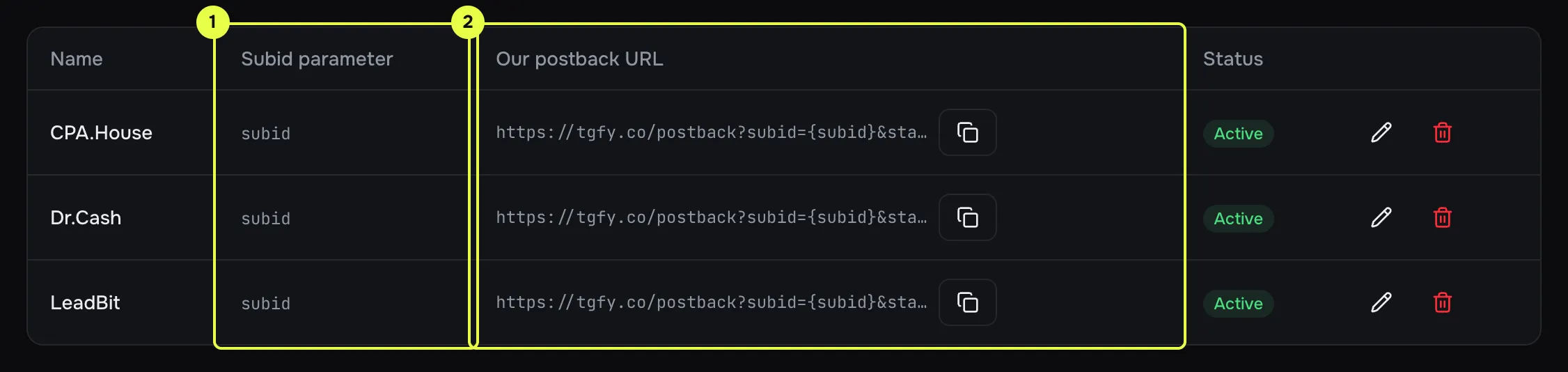
- Subid parameter.
- Postback URL to paste into the network.
-
Set up the offer.
Put
{{click_id}}into the offer URL where the network expects the click id:https://offer.example.com/?aff=42&clickid={{click_id}}If the network calls the parameter
clickid, Telegfy adds it for you from “Subid parameter”. An explicit macro is more reliable: you can see where the value goes. -
Build the postback URL.
Copy “Our postback URL” from the network’s card. It looks like this:
https://<domain>/postback?subid={subid}&status={status}&payout={payout}¤cy={currency}&tid={transaction_id}&network_id=<network id>Now replace the macros inside the curly braces with the network’s own. Do not change the left-hand side.
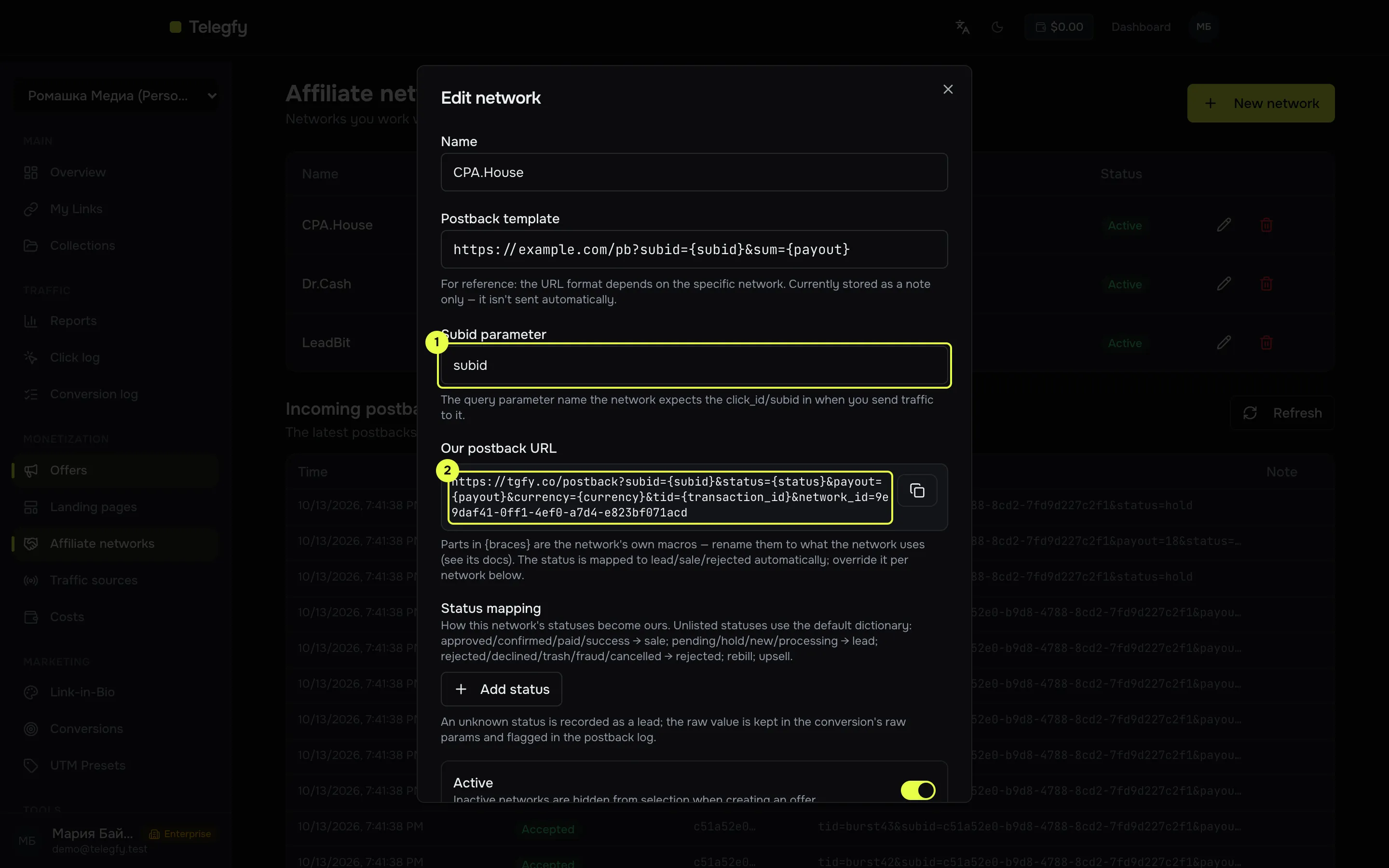
- The subid parameter matches the click id macro.
- Postback URL: paste it into the network.
-
Set up the statuses.
Look at the status list in the network’s account and compare it with the default dictionary (table below). Add any unknown statuses under “Status mapping” in the network’s card.
-
Test with a request.
Окно терминала curl "https://<domain>/postback?subid=<click_id>&status=sale&payout=10¤cy=USD&tid=test-1"A response with
"result":"accepted"means it works. Then check the log on the “Affiliate networks” page.
Building the URL: what you can change
Section titled “Building the URL: what you can change”| Part of the URL | Can you change it? | Example |
|---|---|---|
The parameter name on the left of = |
No: subid, status, payout, currency, tid, goal, network_id are our names |
— |
| The value in curly braces on the right | Yes: it is the network’s macro | status={state}, payout={sum} |
The network_id= value |
No: it is filled in automatically | — |
The goal= parameter |
Yes, if you need a separate goal | goal=upsell, see Goals |
Status dictionary
Section titled “Status dictionary”Telegfy recognises common statuses without any setup. Case does not matter.
| Our status | What arrives from the network by default |
|---|---|
| Sale | approved, approve, confirmed, sale, paid, success |
| Lead | pending, hold, lead, new, processing |
| Rejected | rejected, declined, reject, trash, fraud, cancelled |
| Rebill | rebill |
| Upsell | upsell |
If the network’s statuses are different, add the mapping in the network’s card. Example:
| Network status | Our status |
|---|---|
approved_by_advertiser |
Sale |
on_hold |
Lead |
1 |
Sale |
0 |
Rejected |
The mapping applies to this network only. Telegfy identifies the network by the network_id parameter in the postback URL. If it is missing, the network is taken from the click’s offer. So network_id from the “Our postback URL” block must be in the URL.
Payout and currency
Section titled “Payout and currency”- The amount may use a dot or a comma:
10,5is read as 10.5. - If no payout arrives, the report takes the offer’s payout, but only for the fixed payout model.
- The currency is converted to upper case and cut to three characters. An invalid code is not converted to the base currency, see Currency rates.
Common mistakes
Section titled “Common mistakes”- A wrong click id macro. The status and payout arrive, but the result is
click_not_found. Check thatsubid=uses the same name the network returns. - No
network_id. The status mapping does not apply. Copy the URL from the “Our postback URL” block in full. - More than 6,000 postbacks per minute from one IP. This is rare, but it results in 429. See Troubleshooting.
Read next
Section titled “Read next”- Incoming postbacks: all parameters and responses.
- Postback security: signatures and IP lists, if the network supports them.
- Troubleshooting: if a conversion was not recorded.