
API authentication
The Telegfy API lets you create links, pull reports and push costs from your own systems. All requests go to https://<api-host>/api/v1, where <api-host> is the API address of your installation. The health check is GET /health without the prefix.
Two ways to authenticate
Section titled “Two ways to authenticate”| Method | Header | Use for |
|---|---|---|
| API key | X-API-Key: la_… |
Integrations, scripts, servers. Rights are limited by scopes. |
| Session | Authorization: Bearer <JWT> |
The web app and user sign-in. Rights follow the role in the workspace. |
If X-API-Key is sent but the key is invalid, routes that require authentication return 401. Do not send both headers in one request.
Creating a key
Section titled “Creating a key”Open API Keys (/dashboard/api-keys) and click “Create API Key”.
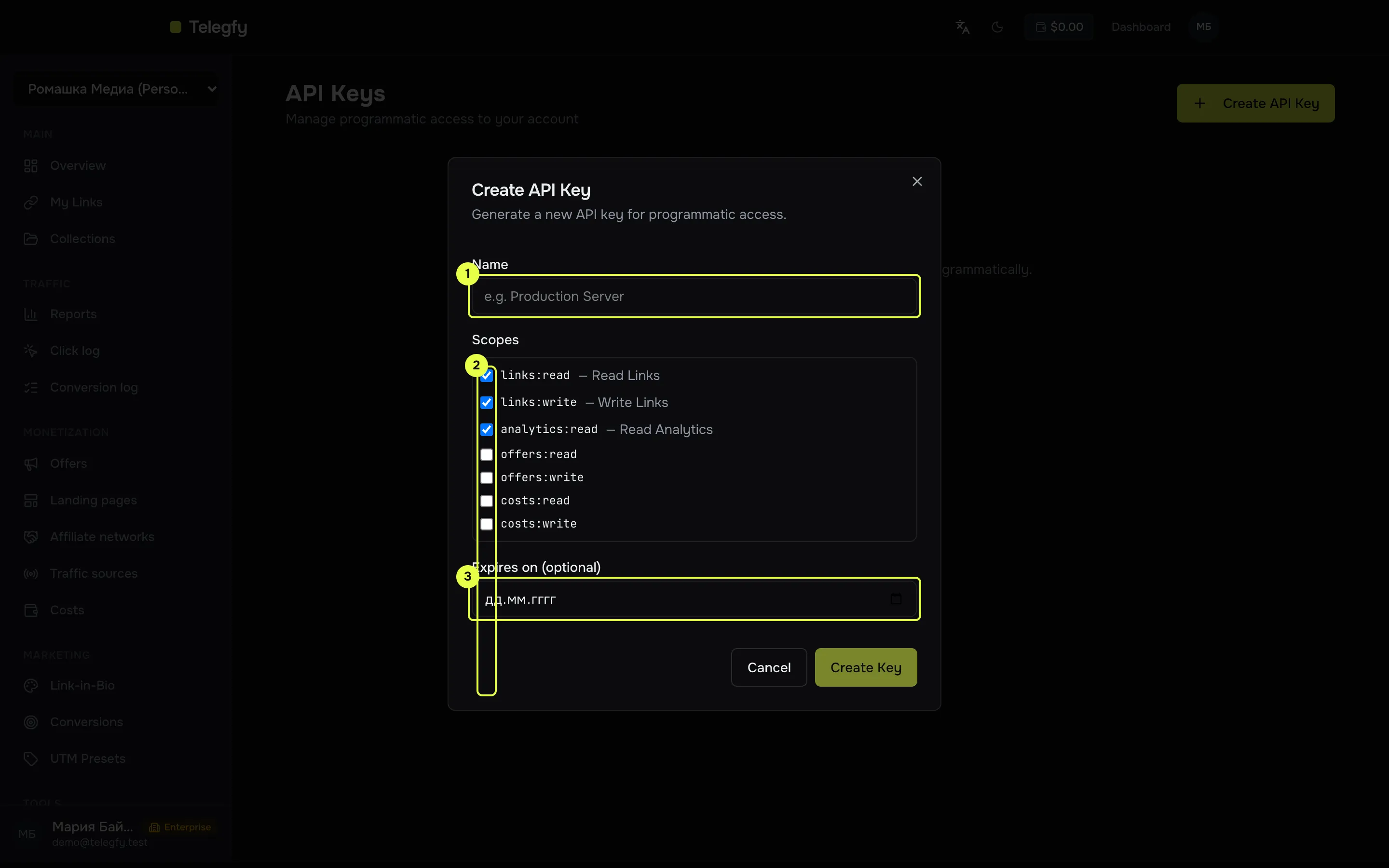
- Name — up to 100 characters. Make it something you will recognise in a month.
- Scopes — see the list below. Defaults:
links:read,links:write,analytics:read. - Expires on — optional. The key stops working after this date.
The key is stored as a bcrypt hash. “Revoke” disables it. A revoked or expired key stops working at once.
How a key works inside a workspace
Section titled “How a key works inside a workspace”- A key works in the workspace where it was created.
- The key’s rights are the rights of its owner in that workspace: role and member restrictions (see buyer access). If the owner is removed from the workspace, deactivated, or the key is revoked, the request gets 401.
- A key created by an owner sees what the owner sees. A key created by a viewer stays read-only, as its owner is.
Scopes
Section titled “Scopes”| Scope | Opens | Includes |
|---|---|---|
links:read |
Read links, collections, rules; the click simulator | — |
links:write |
Create, change and delete links, rules and collections | links:read |
analytics:read |
Link and collection analytics, account overview, funnel | — |
reports:read |
Reports, click and conversion logs, CSV export, saved reports (read) | — |
offers:read |
Offers, landings, affiliate networks (read) | — |
offers:write |
Create, change and delete offers, landings and networks | offers:read |
costs:read |
List costs | — |
costs:write |
Create, bulk-upload, change and delete costs | costs:read |
conversions:read |
Conversion goals, postback log | — |
conversions:write |
Create and change goals, import conversions | conversions:read |
postbacks:read |
Traffic sources and their outgoing postbacks, CAPI integrations (read) | — |
postbacks:write |
Create, change and delete traffic sources and CAPI integrations | postbacks:read |
admin:read |
Every *:read at once |
links, analytics, offers, costs, conversions, postbacks, reports |
admin:write |
Every scope at once | everything |
No route requires admin:* directly; it works only through its implications.
A route needs all the scopes it requires. A key with links:write also gets links:read, because write includes read.
Routes each scope opens
Section titled “Routes each scope opens”Prefix /api/v1 omitted.
| Scope | Routes |
|---|---|
links:read |
GET /links/list, GET /links/:code/rules, POST /links/:code/simulate, GET /collections, GET /collections/:id |
links:write |
POST /links, PATCH /links/:code, DELETE /links/:code, POST/PATCH/DELETE /links/:code/rules[/:ruleId], POST/PATCH/DELETE /collections[/:id], POST /collections/:id/links, DELETE /collections/:id/links/:linkId |
analytics:read |
GET /links/:code/analytics/* (summary, time series, referrers, devices, geo, heatmap, languages, anomalies, A/B, economics, export), GET /analytics/overview/*, GET /links/:code/analytics/funnel, GET /collections/:id/analytics/* |
reports:read |
POST /analytics/report, POST /analytics/report/export, GET /analytics/clicks, GET /analytics/conversions, GET /analytics/reports, GET /analytics/reports/:id, GET /analytics/reports/:id/run |
offers:read |
GET /offers, GET /offers/stats, GET /offers/:id/stats, GET /offers/:id, GET /landings…, GET /affiliate-networks… |
offers:write |
POST/PATCH/DELETE /offers[/:id], and the same write methods for landings and affiliate networks |
costs:read |
GET /costs |
costs:write |
POST /costs, PUT /costs/bulk, PATCH /costs/:id, DELETE /costs/:id |
conversions:read |
GET /conversions/goals, GET /conversions/postback-logs |
conversions:write |
POST /conversions/goals, PATCH/DELETE /conversions/goals/:id, POST /conversions/import |
postbacks:read |
GET /traffic-sources…, GET /traffic-sources/:id/postbacks, GET /capi-integrations… |
postbacks:write |
POST/PATCH/DELETE /traffic-sources[/:id], POST/PATCH/DELETE /capi-integrations[/:id] |
Routes that need no key at all: GET /links/:code, GET/POST /postback, POST /conversions/track, POST /track/pageview, public reports and dashboards by token, and /health.
What keys cannot reach
Section titled “What keys cannot reach”Anything not listed above is closed to keys. The response is 403 This route is not available to API keys. This covers: sign-in and passwords, users, API key management, workspaces and members, billing, custom domains, UTM presets, bot rules, click intake settings, currency rates, lists, alerts, webhooks, postback security, audit log, dashboard management, bio pages, and internal routes.
Saving reports (POST /analytics/reports and edits) is not possible with a key; use a session.
Errors
Section titled “Errors”All errors share one format:
{ "statusCode": 403, "error": "Forbidden", "message": "API key is missing required scope(s): reports:read", "code": "API_KEY_SCOPE_INSUFFICIENT", "timestamp": "2026-10-13T09:15:00.000Z", "path": "/api/v1/analytics/report"}| Status | Meaning |
|---|---|
| 401 | The key is wrong, revoked or expired, or its owner was removed from the workspace or deactivated. |
403 API_KEY_SCOPE_INSUFFICIENT |
A scope is missing. The requiredScopes field lists what is needed. |
403 This route is not available to API keys |
The route is closed to keys. |
402 UPGRADE_REQUIRED |
The feature or limit is not in your plan. |
| 429 | Request limit exceeded. See Retry-After. |
Successful responses are wrapped in { "data": … }. Redirects and 204 No Content are not wrapped.
Request limits
Section titled “Request limits”The limit is the number of requests per minute per endpoint, not per API. Values follow the plan of the key’s owner:
| Plan | Requests per minute per endpoint |
|---|---|
| Anonymous (no key) | 10 |
| Free | 30 |
| Pro | 120 |
| Enterprise | 600 |
- The counter is shared by all keys of one owner, because it is counted per user.
- Responses carry
X-RateLimit-Limit,X-RateLimit-RemainingandX-RateLimit-Reset. A 429 also hasRetry-Afterin seconds. - Separate limits: anonymous
POST /links— 10 per minute. PostbacksGET/POST /postback— up to 6,000 per minute per IP.POST /conversions/track— 600 per minute. Sign-in — 5 attempts per minute per IP. - Redirects and
/healthare not rate-limited.
First request
Section titled “First request”Create a key with the reports:read scope and pull a link report for last week:
export TELEGFY_API="https://<api-host>/api/v1"export TELEGFY_KEY="la_…"
curl -sS -X POST "$TELEGFY_API/analytics/report" \  -H "X-API-Key: $TELEGFY_KEY" \  -H "Content-Type: application/json" \  -d '{    "from": "2026-10-06T00:00:00Z",    "to": "2026-10-12T23:59:59Z",    "groupBy": ["link"],    "metrics": ["clicks", "conversions", "revenue", "cost", "roi"],    "orderBy": { "field": "roi", "direction": "desc" },    "limit": 50  }'
The response has data.rows (each with dimensions and metrics) and data.totals. Metric definitions are in reports.
List your links with the same key (links:read scope):
curl -sS "$TELEGFY_API/links/list" -H "X-API-Key: $TELEGFY_KEY"Endpoint reference
Section titled “Endpoint reference”The API reference covers every endpoint available with an API key, plus the public /postback and /track endpoints. It is generated from the backend code, so it matches what actually works. The scope each route needs is in the table above.
Related
Section titled “Related”- Reports — fields and formulas returned by
analytics/report. - Costs — manual cost entry through the API.
- Incoming postbacks — postbacks need no key.
- Buyer access — restrictions that also apply to keys.