
Outgoing postbacks
An outgoing postback is a request from Telegfy to an ad network or tracker when a conversion is recorded. The traffic source learns that the click brought a sale and can optimise its campaigns.
Setting up a source (address, macros, conditions) is described in Traffic sources. Here is how it works inside.
When a postback goes out
Section titled “When a postback goes out”- A new conversion is recorded, or the status of a conversion changes.
- Telegfy finds the source of the click. If the click has none and the workspace has exactly one active source, it uses that one.
- The source’s conditions are checked: status and minimum payout. The statuses in the conditions are ours (lead, sale, rejected, rebill, upsell), not the network’s.
- The postback is queued with the state “Pending”.
- The queue is processed once a minute. The request goes out, and the result appears in the source’s log.
Where it is set up
Section titled “Where it is set up”The source is created under “Traffic sources” (/dashboard/offers/traffic-sources). The “Postback URL” field starts with the example https://tracker.source.com/postback?clickid={sub_id_1}&payout={payout}. A hint under the field lists all the macros: {click_id}, {status}, {payout}, {currency}, {conversion_id}, {external_id}, {sub_id_1} … {sub_id_10}.
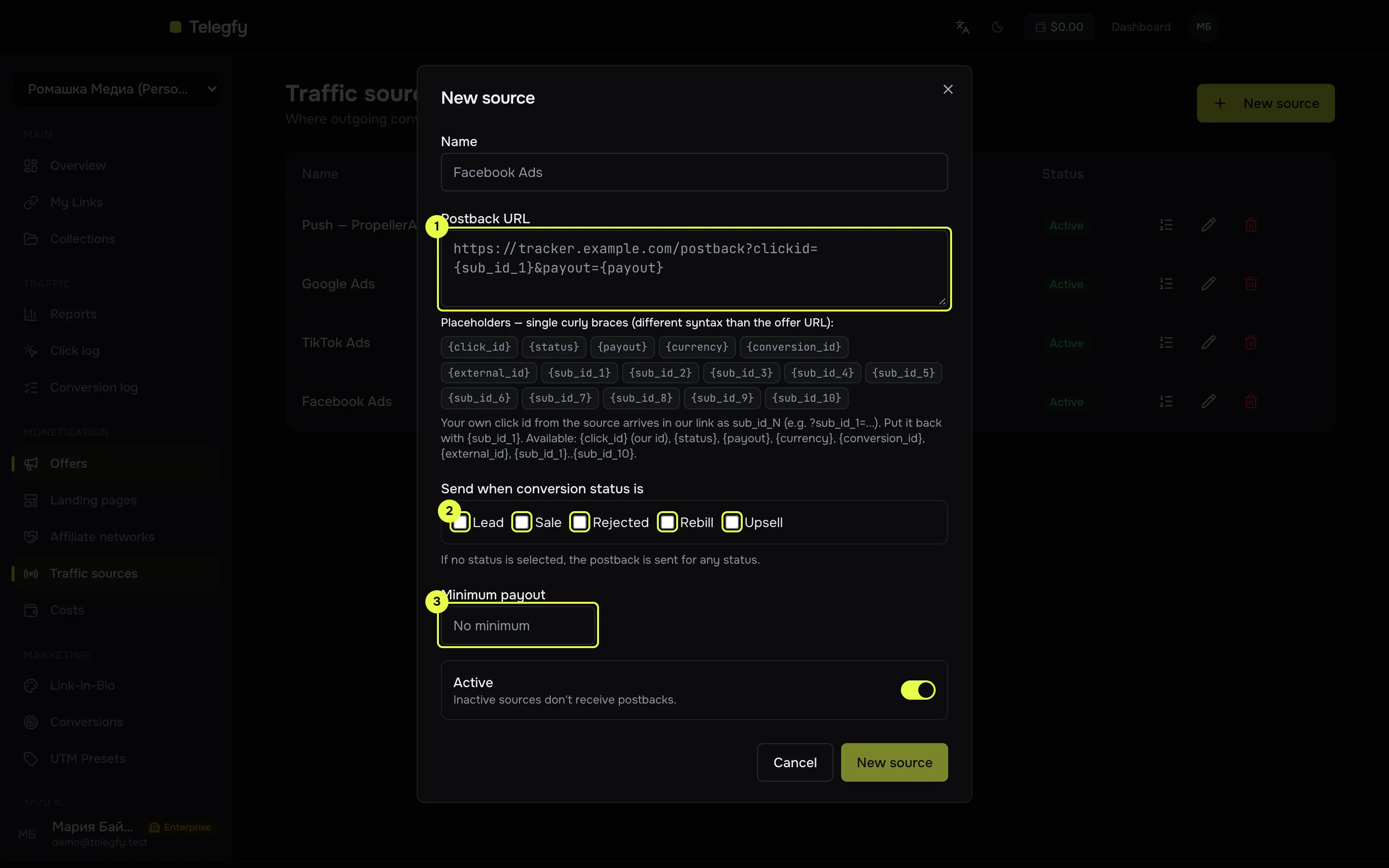
- Postback URL with macros in single curly braces.
- Statuses to send on. Empty means any status.
- Minimum payout.
One postback per status
Section titled “One postback per status”For each combination of conversion, source and status, one postback is sent. If the status does not change, nothing else is sent. If the status changes (lead → sale), a second postback with the new status goes out.
So a source that wants only sales should set the condition “Sale”. Otherwise it will receive the lead and the sale as two separate events.
Request format
Section titled “Request format”- Method
GET. There is no body: all data is in the URL. - Timeout 5 seconds.
- Redirects are not followed. A 3xx response counts as an error. Use the final address.
- Only
httpandhttps. Private IP addresses are blocked.
Retries
Section titled “Retries”If a source responds with an error or does not respond, Telegfy retries. There are up to 6 attempts in total, with pauses of 1 minute, 5 minutes, 25 minutes, 2 hours and 10 hours. After that the state becomes “Failed”.
The state is visible in the source’s log: Pending, Sent or Failed, with the response code and the attempt number.
What to check when a postback does not arrive
Section titled “What to check when a postback does not arrive”| Symptom | What to look at |
|---|---|
| No postbacks in the log | Whether the click’s link has a source. Whether the source is active. Whether the status and payout conditions match. |
| Pending for a long time | The queue is processed once a minute. If the state does not change for long, check the source and contact support. |
| Response code 4xx or 5xx | Whether the URL and macros are right. Whether the source expects another parameter. |
| Failed straight away | The address was rejected: a private IP, not http or https, or a redirect. |
More in Troubleshooting.
What goes to the source
Section titled “What goes to the source”Values are inserted into the macros when the request is sent. The full list of macros is in Traffic sources.
Our click id ({click_id}) and the source’s click id ({sub_id_1}) are different things. If the source wants its own click id, pass it into the link as a sub_id and use {sub_id_1}.
Read next
Section titled “Read next”- Traffic sources: setting up the address, macros and conditions.
- Incoming postbacks: where conversions come from.
- Conversion API: sending to ad platforms through their API instead of a postback.