
Currency rates
If a network pays in EUR and you record traffic spend in USD, a report cannot simply add those numbers. Telegfy converts everything to one base currency. By default it is USD.
Where rates come from
Section titled “Where rates come from”- Automatically. Every night Telegfy loads European Central Bank (ECB) rates through the Frankfurter service. This keeps the fiat currencies in the ECB set up to date.
- Manually. If a currency is not in the automatic set (for example USDT or some CIS currencies), add the rate yourself in “Currency rates”.
Rates are shared across the whole platform, not per workspace. Any user with access can add or change a rate. Enter only values you have checked against a source.
Manual rate
Section titled “Manual rate”Open “Currency rates” (/dashboard/fx-rates) and click “New Rate”.
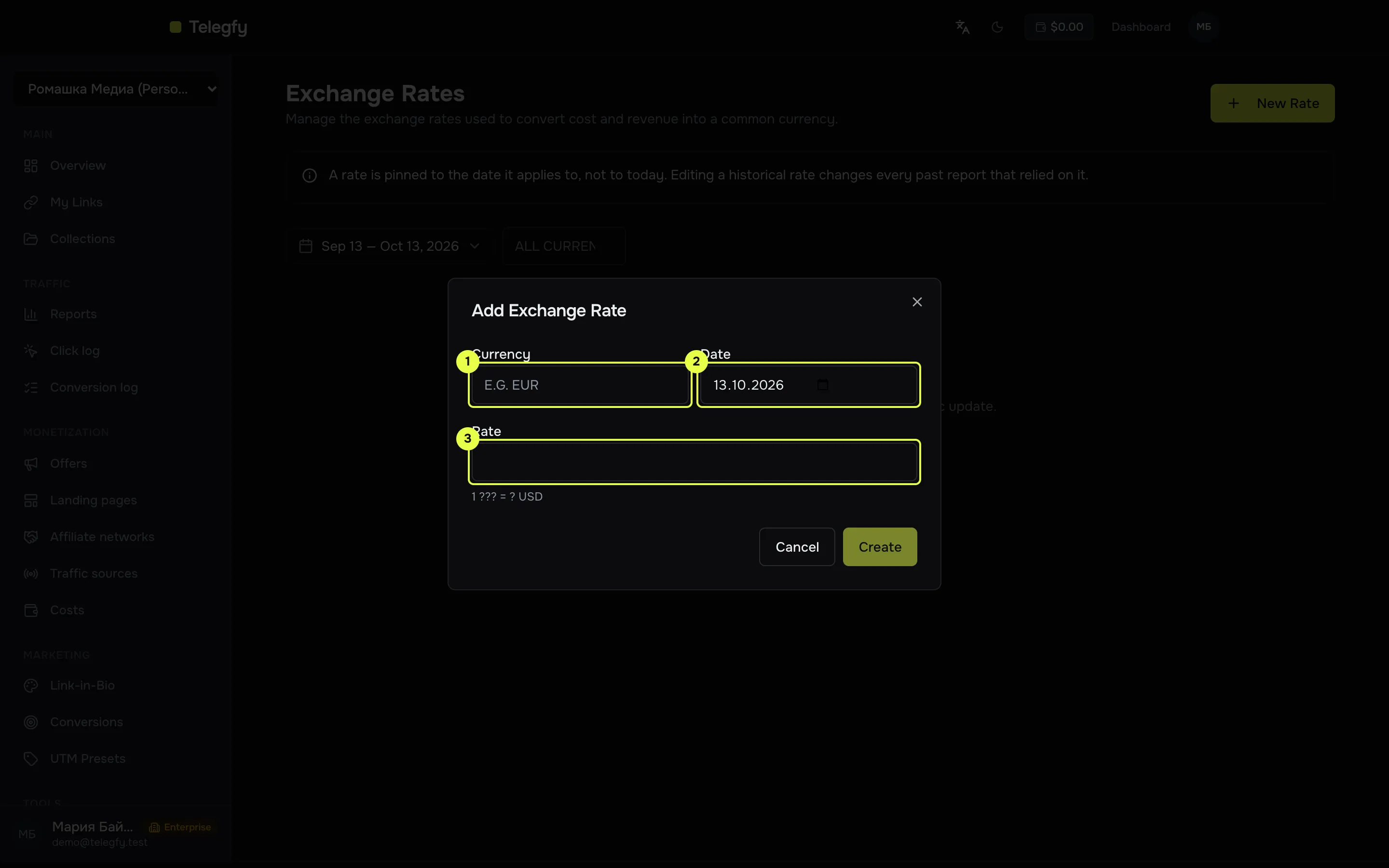
- Currency: a three-letter code.
- Date the rate applies from.
- Rate: how much base currency one unit is worth. A rate is how much of the base currency one unit of the currency is worth. The hint in the form shows the format:
1 {currency} = {rate} {base currency}.
| Field | What to enter |
|---|---|
| Currency | A three-letter code, for example EUR, USDT |
| Date | The day the rate applies to |
| Rate | How much base currency one unit is worth |
A rate applies from its date until a newer one appears. For a conversion, Telegfy uses the latest rate on or before the conversion date. You cannot add a second rate for the same date and currency. Change the existing one instead.
What is converted and when
Section titled “What is converted and when”| What | Which rate |
|---|---|
| Payout and conversion revenue | The rate on the conversion date. Stored when the conversion is recorded and not recalculated later. |
| Automatic click cost (CPC, CPM, from a URL parameter) | The rate on the click date. |
| Manual cost | Spread evenly across the days of the period and converted at each day’s rate. |
Payouts and revenue are fixed when a conversion is recorded. A rate added later does not change them. Costs are converted when a report is built, so adding a rate for a past date changes cost figures in that period.
When a rate is missing
Section titled “When a rate is missing”- The payout or cost stays in its original currency.
- The report shows a mixed-currencies warning. Totals are then not comparable.
- ROI and revenue in that currency can look wrong. Add the rate first, then read the numbers.
Common mistakes
Section titled “Common mistakes”- The rate is inverted. Enter how much base currency one unit is worth. If 1 EUR is worth 1.08 USD, enter
1.08, not0.93. - The currency code is wrong. Telegfy does not check the code against the ISO standard. A currency that is not in the table is not converted.
- The rate is for the wrong date. A rate applies from its date. For a conversion from yesterday you need a rate dated yesterday or earlier.
Read next
Section titled “Read next”- Costs: entering costs and click prices.
- Reports: reading revenue and ROI in the base currency.
- Troubleshooting: if the numbers do not add up.