
Campaigns and links
In Telegfy a campaign is a short link. You put it into an ad, and the clicks on it go into your statistics. In the UI the section is called “My Links” (/dashboard/links).
One link is one ad campaign or one creative. That makes results easy to compare. Breakdowns by sub_id give you the detail inside a link.
Create a link
Section titled “Create a link”Open “My Links” and click “Create Link”. Only the destination URL is required. Everything else is in “Advanced options”.
| Field | What it does |
|---|---|
| Destination URL | Where the click goes if no rule matches. |
| Traffic source | For outgoing postbacks. Visible when the workspace has active sources. |
| Domain | A custom domain or “Default” (the service domain). Custom domains need Pro. |
| Custom alias | A short code instead of a random one. 3 to 50 characters: Latin letters, digits, - and _. |
| Title and tags | For your convenience in the list. |
| Expires on | The date after which the link stops working. |
| Max clicks | After this many clicks the link stops working. |
| Forward query parameters | All parameters of the click are passed to the destination URL. Pro only. |
| UTM parameters | Added to the destination URL. Pro only. |
| Retargeting pixels | Pixels on the redirect page. Pro only. |
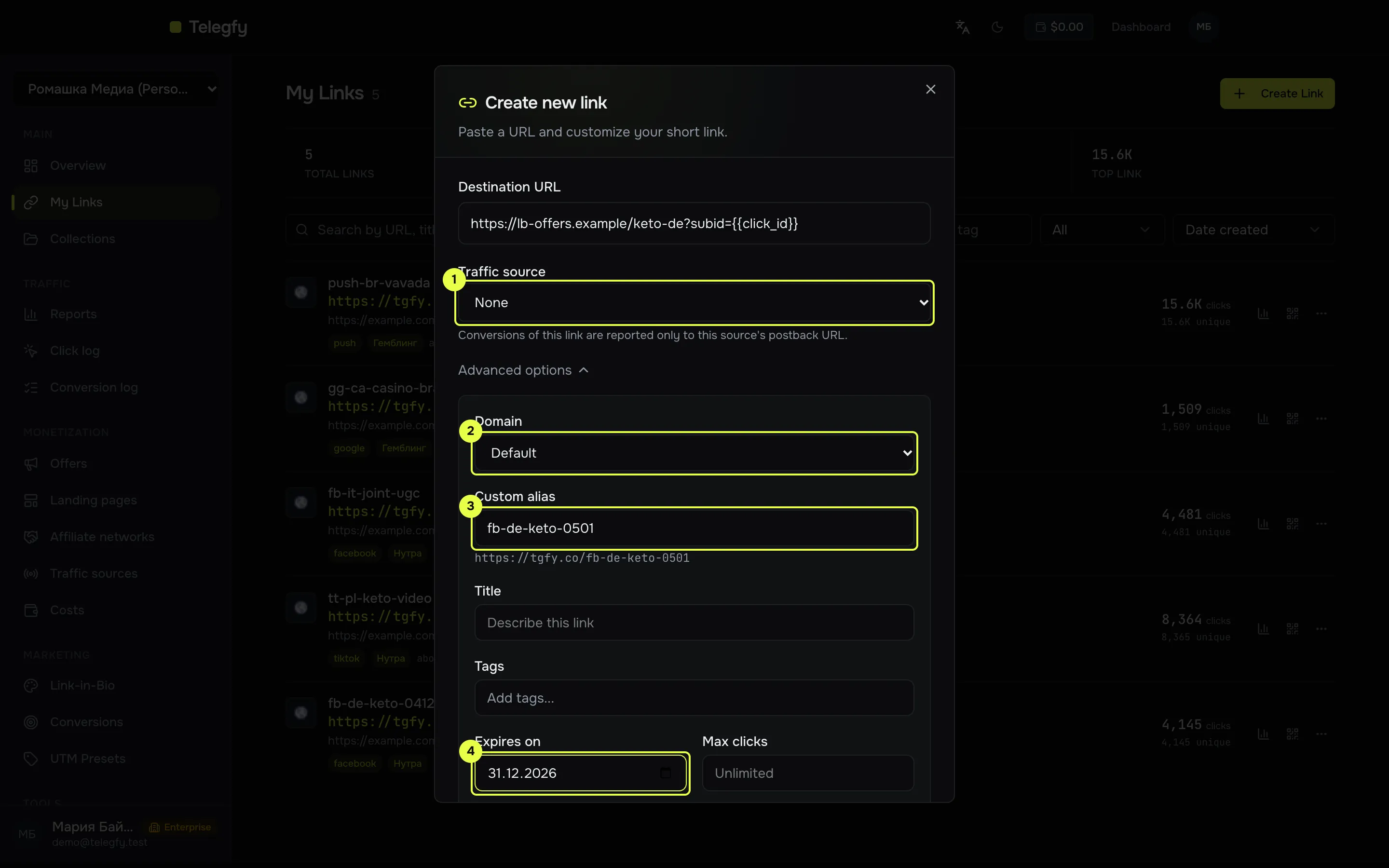
- Traffic source: the “Traffic source” field (
#modal-traffic-source) is shown when the workspace has active sources. - Domain: “Default” or your own domain (Pro).
- Custom alias: up to 50 characters.
- Expires on: the date the link stops working.
Expiry
Section titled “Expiry”- Free — if you do not set a date, the link lives for 30 days.
- Pro and Enterprise — no expiry unless you set one.
For an ad campaign that runs for months, set an expiry date explicitly or move to Pro.
Sub_id: labels in the link
Section titled “Sub_id: labels in the link”Labels from the ad are passed to the link as sub_id_1 … sub_id_30. Any utm_* parameter is kept as well. For example:
https://<domain>/<code>?sub_id_1={ad_id}&sub_id_2={campaign_id}&sub_id_3={placement}The values such as {ad_id} are filled in by the ad platform. Platforms may call their parameters by other names, so check their documentation. Examples per platform are in the guides.
In reports, group by the “Sub ID” level with the parameter name, for example sub_id_1.
Macros in the link’s URL
Section titled “Macros in the link’s URL”Macros {{...}} in the destination URL of the link itself are a Pro feature. Macros in an offer URL do not depend on the plan. So it is better to set an offer that uses macros in a rule, not in the link’s destination URL.
Edit and turn off
Section titled “Edit and turn off”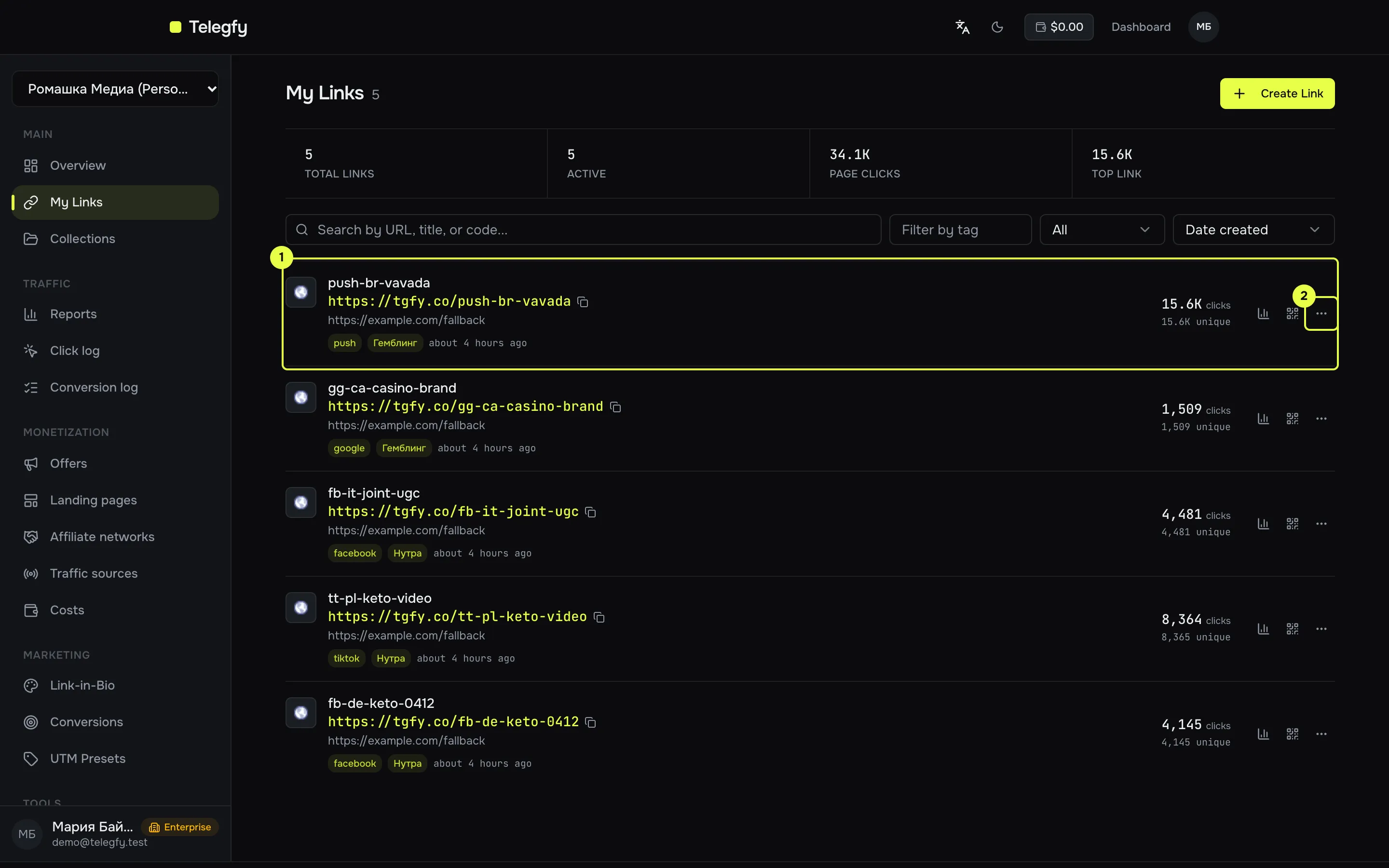
- The link row: short address, statistics, status.
- The “…” menu: open, analytics, routing rules, edit, delete.
- “…” menu → “Edit”. Here you change the destination URL, the traffic source, the expiry and the parameters.
- Turn a link off with the “Active” switch. An inactive link does not open.
- “Delete” deactivates the link: visiting it stops working.
Limits
Section titled “Limits”| Plan | Active links | Collections |
|---|---|---|
| Free | 20 | 3 |
| Pro | 500 | 50 |
| Enterprise | No limit | No limit |
Collections are groups of links. A conversion goal can be limited to a collection.
Read next
Section titled “Read next”- Routing rules and flows: attach an offer or a landing to a link.
- Quick start: the full path from link to conversion.