
Routing rules and flows
A routing rule decides where a click goes: to an offer, to a landing, to another URL, or to a response without a redirect. Rules belong to a link. Every link has its own set of rules.
Where to set them up
Section titled “Where to set them up”- In “My Links”, open the “…” menu of the link and choose “Routing rules”.
- The link’s analytics page has a “Routing rules” block. It is a simplified editor: geo, device, A/B test and rotation with a destination URL. Landings, the “Landing + Offer” and “Action” schemas, filters and the simulator are only on the rules page.
The rules page is at /dashboard/links/<code>/rules. It has two tabs: “Rules” and “Click Simulator”.
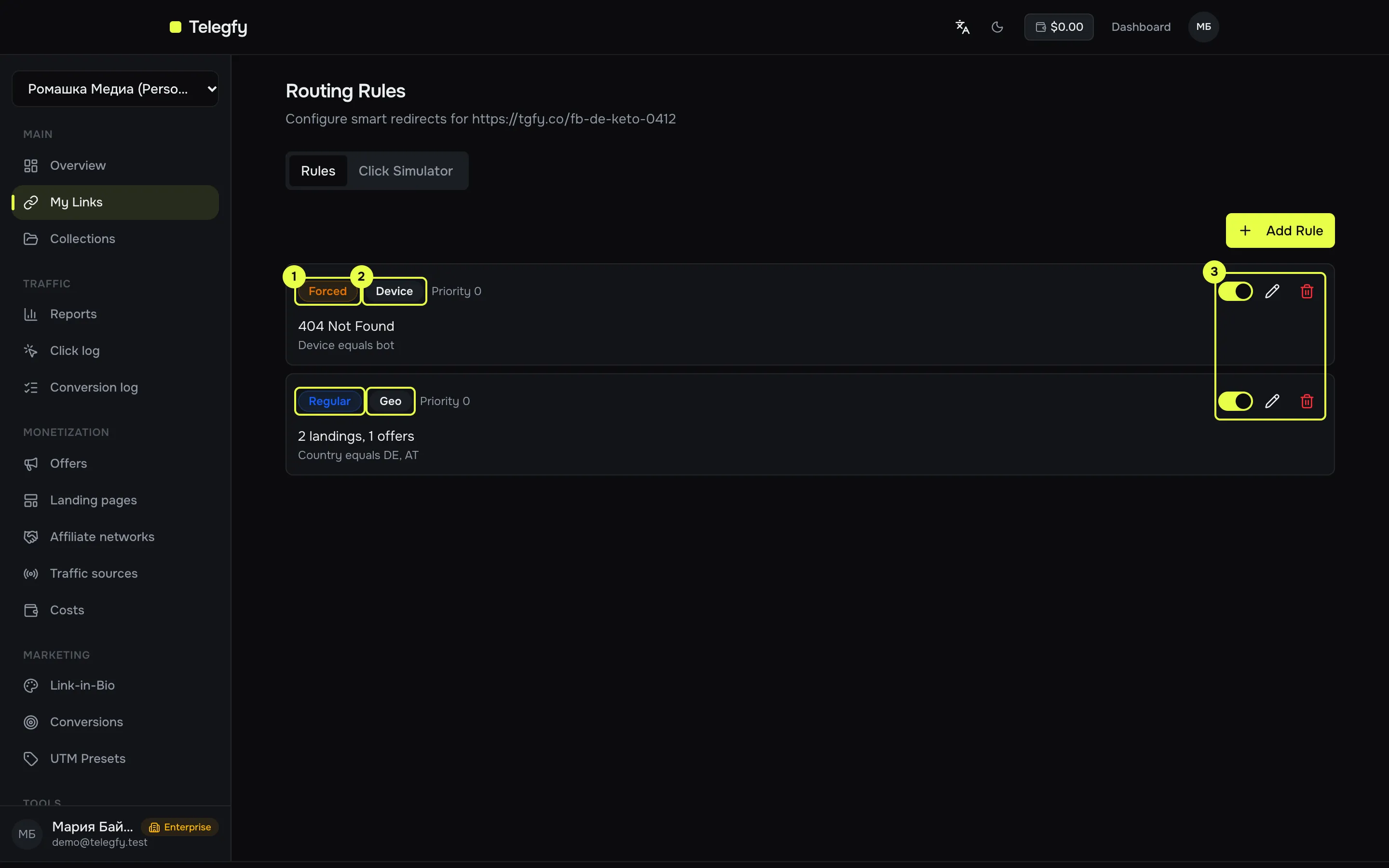
- Flow type: Forced, Regular or Default.
- Rule type: Geo, Device, A/B Test or Rotation.
- Active switch, edit and delete.
Order of checks
Section titled “Order of checks”A click is checked against the flows in this order:
- Forced. Checked first. The first matching rule wins at once.
- Regular. Checked by priority. A/B tests and rotations with the same priority are grouped. The whole flow is skipped for clicks that hit the workspace’s blocklist or allowlist.
- Default. The fallback. It applies only if no forced and no regular rule matched.
If no rule matches, the click goes to the link’s destination URL.
Rule types
Section titled “Rule types”| Type | What it does |
|---|---|
| Geo | Filters by conditions, for example country. Fires as soon as the conditions match. |
| Device | The same, usually with device conditions. Functionally it is the same as Geo: conditions are set with the same builder. |
| A/B Test | A weighted choice between rules with the same priority. The visitor stays with one variant for 30 days. Weight is set in the “Weight” field, from 1 to 100. |
| Rotation | Round-robin between matching rules with the same priority. Weight is ignored. |
What happens on a match
Section titled “What happens on a match”| Action | What it does |
|---|---|
| Redirect | Sends the visitor to the destination URL. Redirect type: 301, 302, 307, meta refresh, double meta refresh, JavaScript or iframe. Default 302. |
| Landing + Offer | A landing and an offer are chosen by two independent draws, each with its own weight. A rule may have no landings: then traffic goes straight to the offer. See Landings. |
| Action | Show HTML or text, return 404, return nothing (blank response), or hand the click to another link by its short code. Hand-off works up to three hops in a row. |
Conditions
Section titled “Conditions”Conditions are a list of filters. Match “ALL (AND)” or “ANY (OR)”. A rule with no conditions matches all traffic.
| Field | What is checked |
|---|---|
| Country | ISO-2 country code, for example DE, PL. |
| City | City from the IP. |
| Device, OS, browser | Detected from the User-Agent. |
| Language | The first language in Accept-Language, for example en-US. For all English variants use the mask en*. |
| IP address | An exact address, a mask or CIDR. IPv4 only. |
| Referrer, “Referrer is empty” | Where the click came from. |
| Is a bot | The built-in User-Agent check. Custom bot rules do not affect it. |
| Query parameter | Any query parameter of the click, by name. |
| Sub ID | Only sub_id_1 … sub_id_30 and utm_*. |
| Time of day | Days of the week, a time window and a time zone. Default UTC. |
| Date range | Inclusive dates. A date without a time means the whole day. |
Comparison modes for text fields: exact match, mask (* and ?), regular expression, empty. Any mode can be inverted with “does not equal”.
Priority and weight
Section titled “Priority and weight”- Priority — a number from 0. Lower means earlier. It applies inside a flow type.
- Weight — from 1 to 100. It matters only in an A/B test between rules with the same priority.
Example: a separate offer for Germany
Section titled “Example: a separate offer for Germany”Requirement: traffic from Germany goes to the DE offer, and all other traffic goes to the default offer.
- Rule “Geo”, flow “Regular”, priority 0, condition “Country” equals
DE, action “Landing + Offer”, offer DE. - Rule “Geo”, flow “Default”, no conditions, action “Landing + Offer”, default offer.
Click simulator
Section titled “Click simulator”On the “Click Simulator” tab you can check a decision without recording a click. Enter a country, device, browser, sub_ids and parameters. The simulator shows which rule matched and the final decision: redirect, landing with offer, action, or “no rule matched”.
The simulator records nothing: no clicks, no sticky bindings, no rotation counters and no caps.
Common mistakes
Section titled “Common mistakes”- A rule does not fire. Check that it is active, that its flow type is right, and that its conditions match the click. The simulator shows which filter failed.
- The offer is not chosen. The offer is at its cap, unhealthy or inactive. The rule then skips it and the click goes on.
- The A/B test does not split traffic. The variants must have the same priority. Otherwise only the first one fires.
- An IPv6 rule. IP filters work with IPv4 only.
Read next
Section titled “Read next”- Networks and offers: caps and offer health affect the choice.
- Landings: how to put a landing into a rule.
- Bot filtering: what counts as a bot.