
Domains
A tracking domain is the address your short links and postbacks run on. Networks and ad platforms see your domain, not the service domain. It looks more professional and raises fewer questions during ad review.
| Plan | Custom domains |
|---|---|
| Free | None. Links use the service domain. |
| Pro | Up to 5 domains per workspace. Attaching a domain to a link needs Pro. |
| Enterprise | No limit. |
Connect a domain in four steps
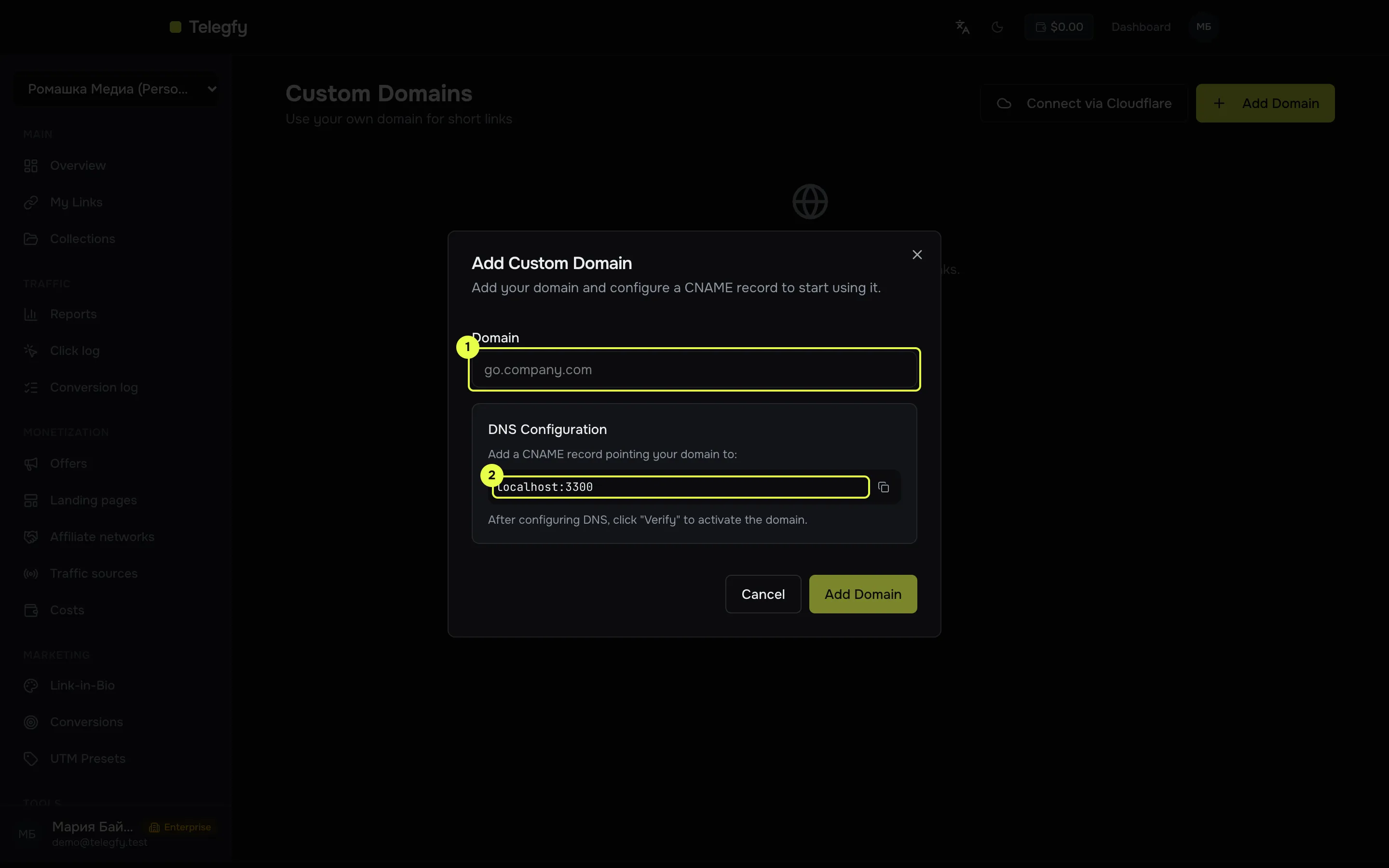
Section titled “Connect a domain in four steps”Open “Domains” (/dashboard/custom-domains) and click “Add Domain”.
-
Domain field: a subdomain, for example
go.example.com. -
CNAME target: the value for the record at your registrar. Copy it with the button.
-
Choose a subdomain. Use a subdomain such as
go.example.com. The apex domain (example.com) cannot be verified with a CNAME. -
Create the CNAME at your registrar. The name is your subdomain without the root (
go), and the value is the “CNAME Target” shown in the table or in the “DNS Configuration” block. The value can be copied with a button. -
Verify. Click the ↻ icon in the domain row. It stays visible until the status is
verified. -
Use it. Once the status is
verified, the domain appears in the “Domain” field when you create a link.
Verification errors
Section titled “Verification errors”| Message | What to do |
|---|---|
CNAME record not found. Expected ... got ... |
The CNAME is missing or points somewhere else. Check the name and the value. |
DNS lookup failed |
The record has not propagated or is wrong. Wait and retry. |
Verification checks the CNAME only. No TXT record is needed.
Cloudflare: connect in one click
Section titled “Cloudflare: connect in one click”If your DNS is in Cloudflare, choose “Connect via Cloudflare” and paste an API token with permission to edit DNS for the zone. Telegfy creates a proxied CNAME for you. The domain is marked verified straight away.
Default action
Section titled “Default action”You can set what the root of the domain (https://go.example.com/) shows:
- Show 404 — a standard not-found page.
- Redirect to URL — enter the address.
- Redirect to link — choose one of your short links in this workspace.
The default action applies only to the root of the domain. Links with a code work as usual.
Backup pool and reputation
Section titled “Backup pool and reputation”Every hour Telegfy checks verified domains: whether DNS resolves, whether the domain is listed in Spamhaus DBL, and whether HTTPS responds. If a domain is flagged or unreachable, its links move to a backup domain from the pool and the domain is taken out of rotation. You receive a notification (the domain_banned webhook event). You can mark a domain as part of the backup pool in its settings.
You can also run a reputation check on demand with “Recheck now”.
Common mistakes
Section titled “Common mistakes”- Apex domain.
example.comcannot be verified with a CNAME. Use a subdomain. - CNAME pointing elsewhere. The value must match the “CNAME Target” in the interface, not your website’s address.
- Link on a domain that is not verified. A link can only be created on a domain with the status
verified.
Read next
Section titled “Read next”- Campaigns and links: choosing a domain when you create a link.
- Quick start: if you do not need a domain yet.