
Traffic sources
A traffic source is the recipient of outgoing postbacks. When a conversion is recorded, Telegfy sends it to the source: an ad network or tracker that needs to know a click brought a sale. Push networks and other platforms that accept postbacks work this way.
A source does not do attribution. It only receives conversions back.
Create a source
Section titled “Create a source”Open “Traffic sources” (/dashboard/offers/traffic-sources) and click “New source”.
- Name — for you, for example “PropellerAds — push”.
- Postback URL — the address Telegfy calls with a GET request. Macros use single curly braces.
- Send when conversion status is — if you select statuses, the postback is sent only for them: Lead, Sale, Rejected, Rebill, Upsell. If you select none, it is sent for any status.
- Minimum payout — the postback is sent only if the payout is at least this amount. No payout means no postback.
- Active — an inactive source receives nothing.
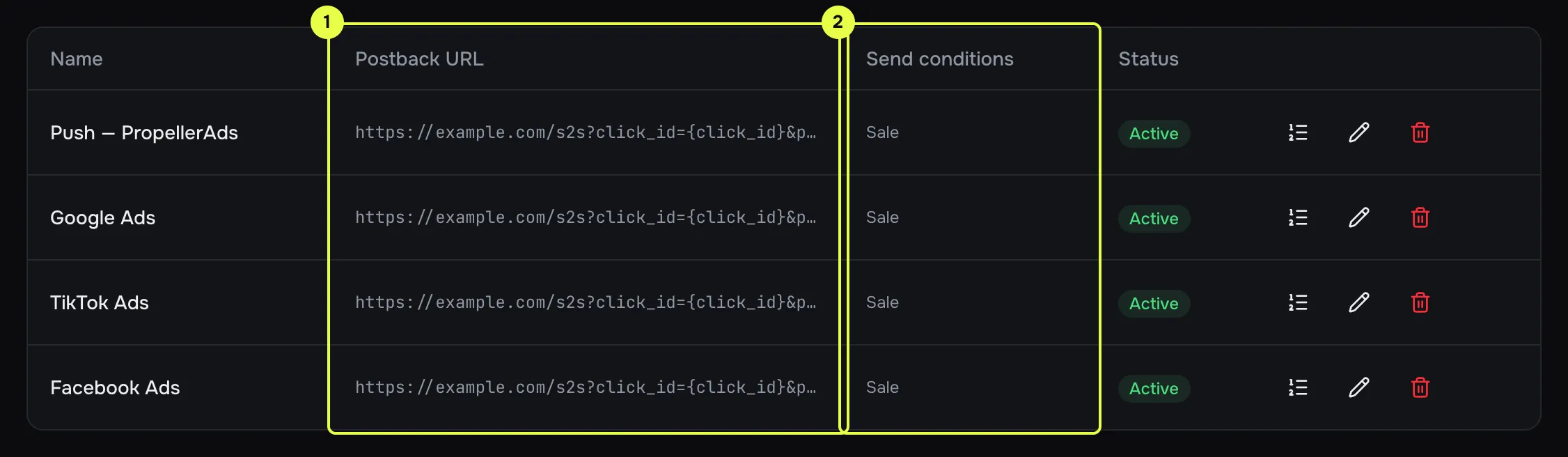
- Postback URL: the template with macros.
- Send conditions: statuses and minimum payout.
Macros in the postback URL
Section titled “Macros in the postback URL”Macros use single curly braces. This is not the syntax of the offer URL, which uses double braces.
| Macro | Value |
|---|---|
{click_id} |
Our click id (UUID of the click) |
{status} |
lead, sale, rejected, rebill or upsell |
{payout} |
Payout from the network’s postback |
{currency} |
Payout currency |
{conversion_id} |
Conversion ID in Telegfy |
{external_id} |
tid (transaction ID) from the network’s postback |
{sub_id_1} … {sub_id_10} |
sub_id values from the click |
Values are URL-encoded when inserted.
Return the source’s click id
Section titled “Return the source’s click id”The source’s click id reaches our click if you pass it to the link as a sub_id. Then you can send it back in the postback.
-
In the ad, add the source’s own macro to the link URL, for example
https://<domain>/<code>?sub_id_1={source_click_id}. Take the exact macro from the source’s account. -
In the postback URL use
{sub_id_1}, not{click_id}:https://tracker.example.com/postback?clickid={sub_id_1}&status={status}&payout={payout}
Postback log
Section titled “Postback log”Open a source in the list to see its history.
| State | Meaning |
|---|---|
| Pending | The postback is waiting to be sent. The queue is processed once a minute. |
| Sent | The source replied. Check the status code. |
| Failed | Retries are exhausted or the request was rejected. Check the status code and the attempt number. |
If a postback was not sent, see Troubleshooting.
Common mistakes
Section titled “Common mistakes”- A link without a source. Clicks on such a link send no postback when the workspace has more than one active source.
- Conditions do not match. The source expects
sale, but the conversion arrived aslead. - Invalid address. Telegfy does not send postbacks to private IP addresses or to addresses that do not start with http or https. Such a URL will not be saved.
Read next
Section titled “Read next”- Outgoing postbacks: when and how a request is sent, retries, duplicates.
- Campaigns and links: where to pick a source when you create a link.