
Postback security
A postback address can leak: it is visible in the network’s account, and it can be seen in logs or settings. Someone who sends a fake postback with a valid click id can inflate your conversions. Protection closes that gap in two ways. Both are optional and are enabled separately.
- HMAC signature. Telegfy checks that the click id is signed with your secret.
- IP allowlist. Telegfy accepts postbacks only from the networks’ addresses.
Settings are in “Postback Security” (/dashboard/postback-security).
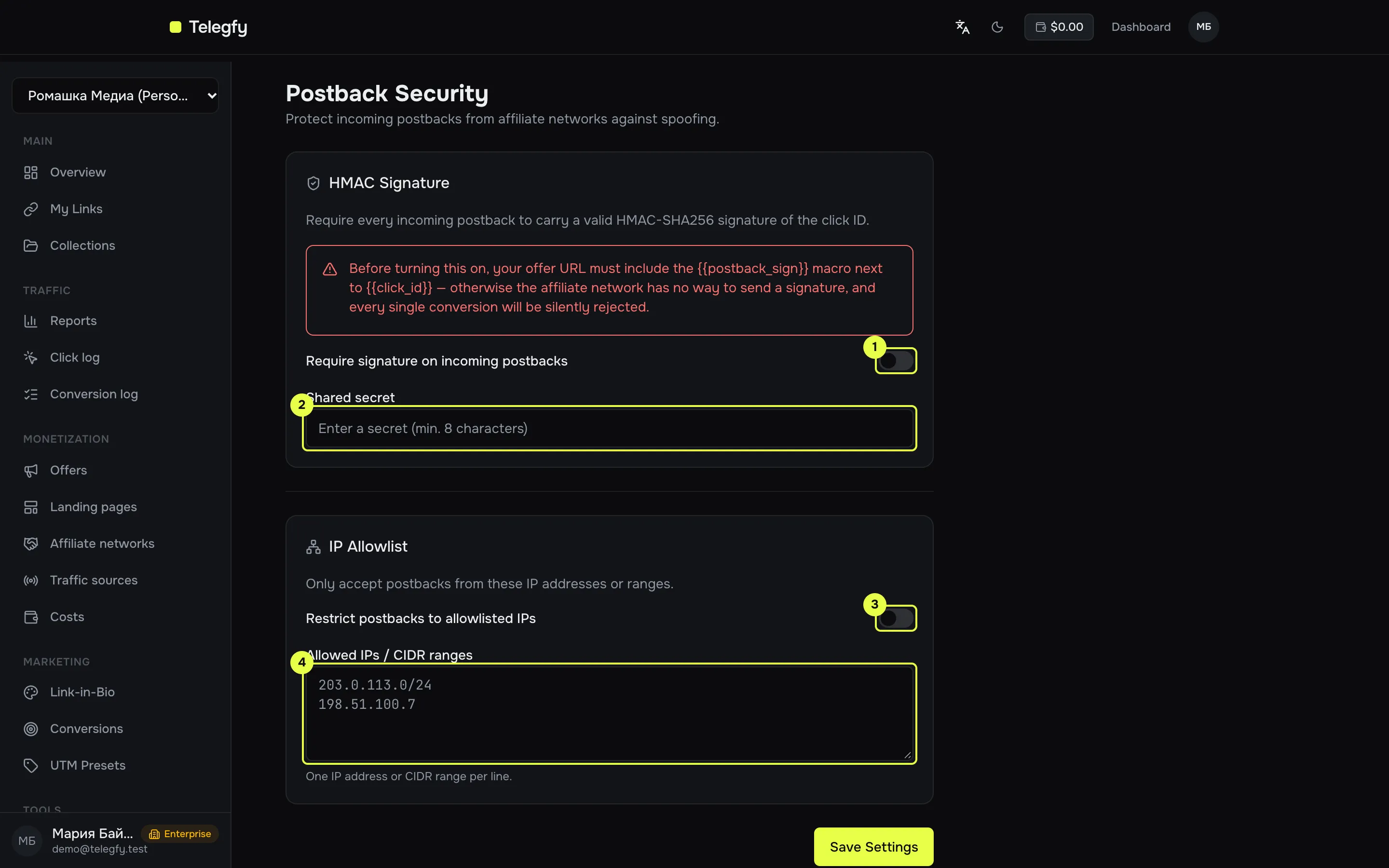
- HMAC signature toggle.
- Shared secret field.
- IP list toggle.
- Allowed IPs and CIDR ranges field.
HMAC signature
Section titled “HMAC signature”The signature is HMAC-SHA256 of the click id with your secret, in hex (64 characters). The check compares signatures in constant time.
It needs three parts to work: the secret on our side, the signature macro in the offer URL, and the network returning the signature.
-
Set the secret.
In “Postback Security”, enter a shared secret of at least 8 characters and save. The secret is shown only while you type it. It is not shown again.
-
Add the macro to the offer URL.
Next to
{{click_id}}, add{{postback_sign}}. Pick a parameter name that the network will return in the postback:https://offer.example.com/?subid={{click_id}}&sign={{postback_sign}}Changes to the signature settings reach new links within 60 seconds.
-
Check that the network returns the signature.
The network must send the value back in the postback. Telegfy accepts the signature in the parameters
sign,signatureorhmac. If the network returns it under another name, change the name in the offer URL. -
Turn on the requirement.
Switch on “Require signature on incoming postbacks” and save.
A postback with a wrong or missing signature gets the result rejected and is not recorded as a conversion. The response is still HTTP 200, so the network may not notice the error. Check the inbound postbacks log.
If the click id is unknown, the signature check does not run. The result is click_not_found.
IP allowlist
Section titled “IP allowlist”Enter addresses and CIDR ranges, one per line:
203.0.113.10198.51.100.0/24Only IPv4 works. IPv6 addresses in the list never match.
The IP is taken from the first value of the X-Forwarded-For header, then from X-Real-IP, then from the connection address. If Telegfy sits behind your own proxy, check that the header carries the network’s real address. Otherwise the list will not work correctly.
How to test
Section titled “How to test”- Turn protection on, but do not require signatures yet.
- Send a test postback with a correct signature. The result should be
accepted. - Send the same request with a wrong signature. The result is
rejected, and the log shows the reason. - Require signatures. A test request without a signature should get
rejected.
Read next
Section titled “Read next”- Incoming postbacks: parameters and responses.
- Troubleshooting: if postbacks are rejected.