
Push networks
Push traffic is cheap, so three things matter on it: returning the network’s click id to it, seeing zones and campaigns in reports, and not paying for bots. The scheme runs both ways: the network sends clicks to us, and we return conversions to it through an outgoing postback.
What the network does
Section titled “What the network does”The network puts its own macros into the address of your link: the click id (its ID for the click), the zone, the campaign and often the click price. Names differ between networks, for example ${SUBID}, {zoneid}, {campaignid}, {cost}, [CLICK_ID]. Use the ones your network actually supports.
The source in Telegfy
Section titled “The source in Telegfy”In “Traffic sources”, create a source with the network’s postback address. The “Postback URL” field starts with an example that uses the {sub_id_1} macro. A hint under the field lists the other macros.
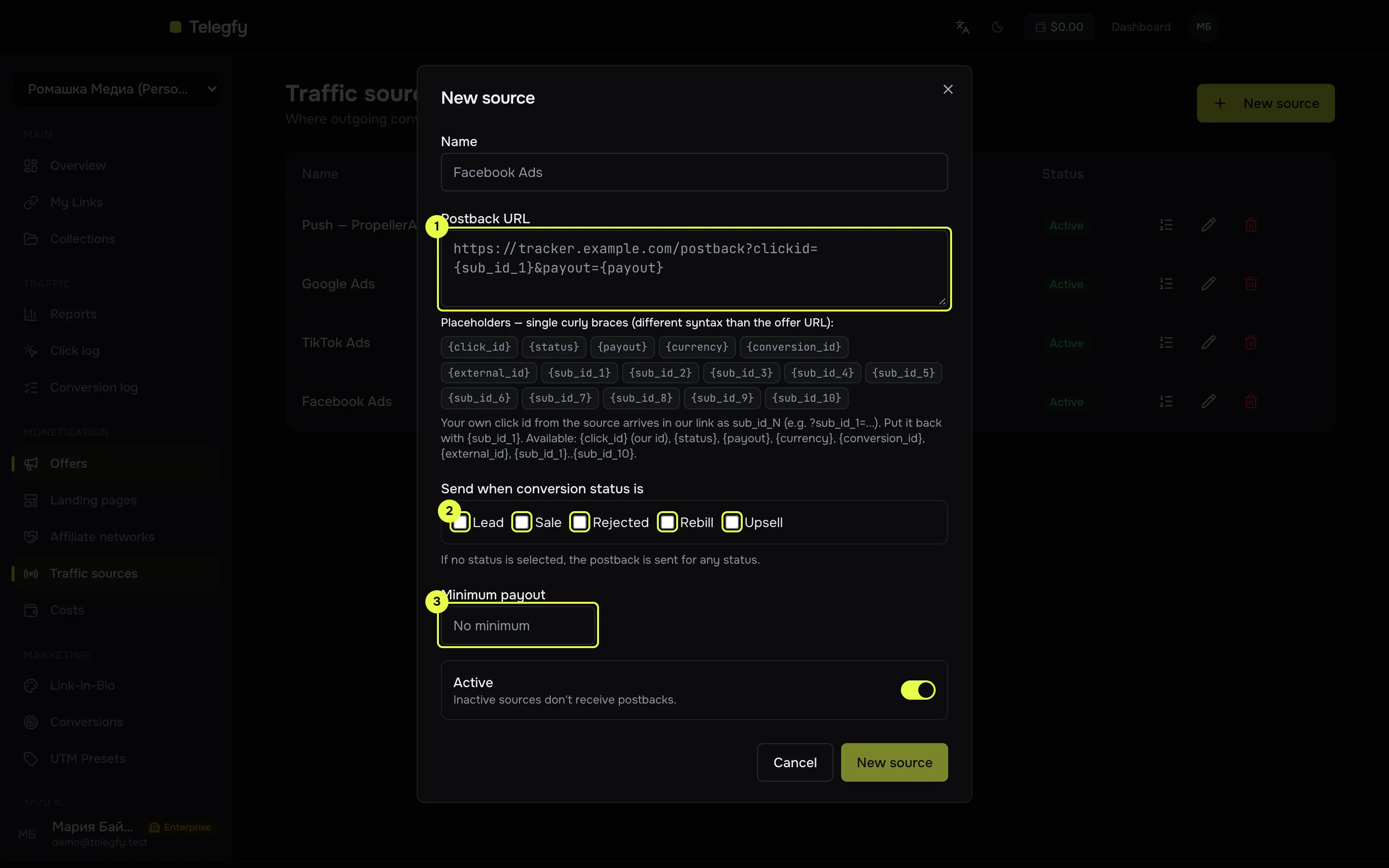
- The network’s postback URL.
- Statuses to send on.
- Minimum payout.
-
Create a link in Telegfy.
The short address
https://<domain>/<code>becomes the destination in the push network’s account. For push it helps to create a separate link for each campaign. -
Pass labels to the network.
In the link address, pass the
sub_id_Nparameters with values from the network’s macros. For example:https://<domain>/<code>?sub_id_1=<network click id macro>&sub_id_2=<zone macro>&sub_id_3=<campaign macro>We store the value of
sub_id_1on the click. It is the value we return to the network in the postback. -
Set up the postback to the network.
In “Traffic sources” (
/dashboard/offers/traffic-sources), create a source with the postback address from the network’s account. In the address, use{sub_id_1}in place of our{click_id}:https://<network postback address>?<click id parameter>={sub_id_1}&status={status}&payout={payout}Take any other parameters the network needs (for example, an account identifier) from its instructions. The macro
{external_id}gives thetidfrom the network’s postback, if there was one. -
Set the send conditions.
If the network pays only for sales, set “Send when conversion status is” to “Sale”. With no conditions, the postback also goes out for leads.
-
Use the click cost, if the network sends it (optional).
In “Click intake”, choose the model “From a URL parameter”. The default parameter name is
cost. So the link must carrycost=<network's click price macro>. The number is added to the cost of each click.
What to check in reports
Section titled “What to check in reports”- Bots. Push traffic often contains bots. Use the “Bot” filter in reports and look at the share. For more, see Bot filtering.
- Uniqueness. Set the dedup window in “Click intake” if one person clicks many times.
- Zones. Group the report by the sub_id named
sub_id_2to see which zones pay.
Common mistakes
Section titled “Common mistakes”- The network does not get its own click id. The address does not carry its macro, or the network does not pass the value through
sub_id. Check on a test campaign first. - The postback to the network does not go out. The source is not attached to the link, or the conditions did not match. See Outgoing postbacks.
- The postback went out with
{click_id}instead of{sub_id_1}. The network received our UUID, not its own identifier. Replace the macro in the postback address.
Read next
Section titled “Read next”- Traffic sources: more on macros and conditions.
- Outgoing postbacks: retries and states.
- Any network via S2S: if you need an incoming S2S link from the network.