
Buyer access
A buyer runs their own campaigns and should not see other people’s links, partner numbers or company profit. The owner sets restrictions per member. They sit on top of the role.
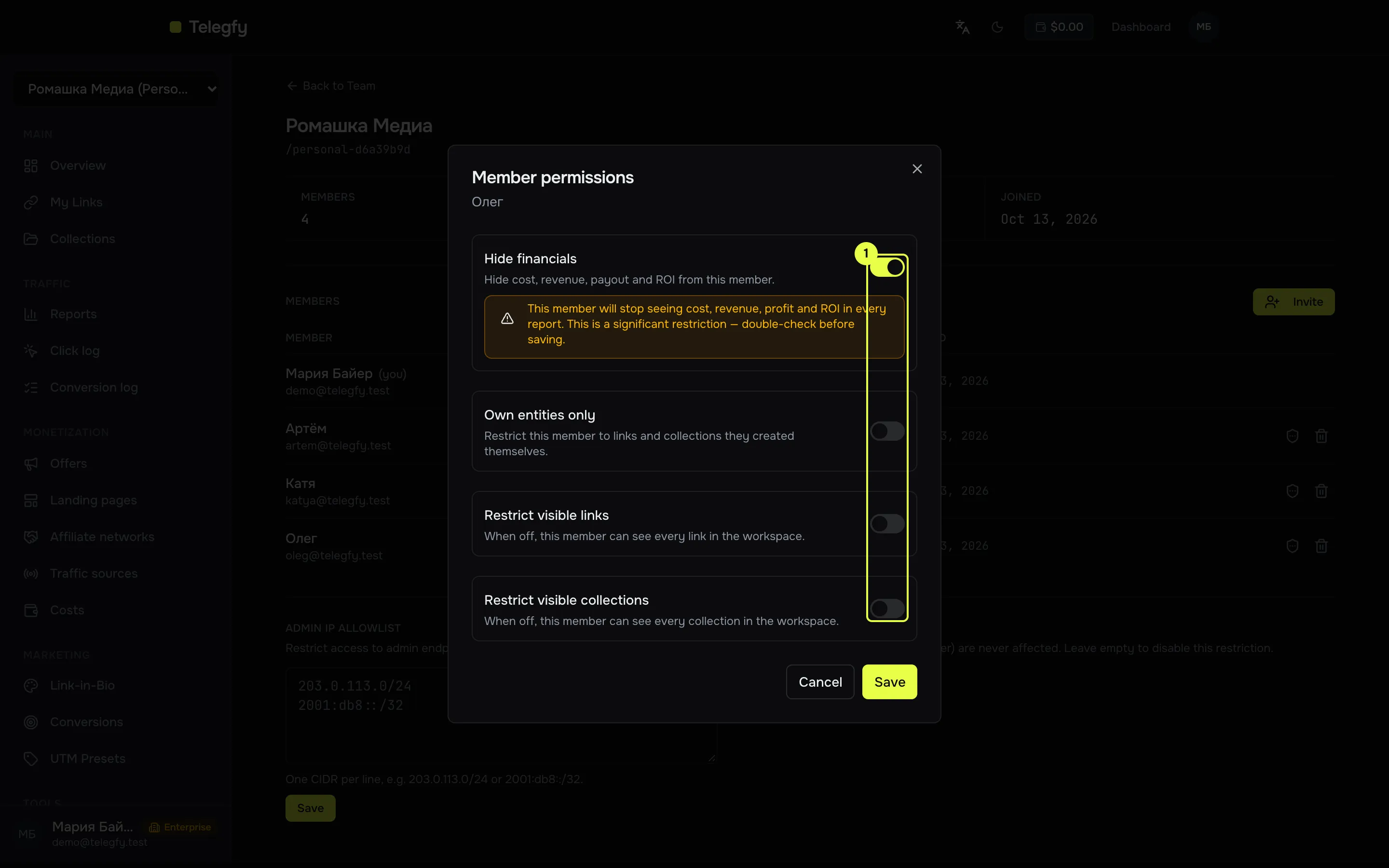
- Hide financials — cost, revenue, payouts and ROI are not shown to this member.
- Own entities only — only links and collections the member created are visible.
- Restrict visible links and Restrict visible collections — an allowlist. Off = everything is visible.
What is restricted
Section titled “What is restricted”Hide financials
Section titled “Hide financials”Money fields are removed from every API response: cost, revenue, payouts, profit, ROI, EPC, CPC, CPM and similar. Clicks and conversions stay.
- In reports, the metrics revenue, cost, profit, ROI, EPC, CPC and cost per 1000 clicks disappear, including custom formulas built from them.
- The Economics tab shows no money.
- The conversion log hides amounts and payouts. Statuses and TIDs stay visible.
- The CSV export has no financial columns.
- The Costs list is empty.
Own entities and allowed links
Section titled “Own entities and allowed links”Restrictions apply to links and collections. When several are on, a link is visible only if it passes all enabled restrictions. An empty allowlist of links or collections means the member sees nothing.
The author of a link is the person who created it. With “Own entities only”, links created by other members are hidden, even if they sit in a collection the buyer can see.
Link restrictions apply to:
- the links list and a link’s detail page;
- link and collection statistics;
- reports, the click log, the conversion log and CSV export;
- the Economics tab and the analytics overview;
- dashboards;
- Costs: with “Own entities only”, the records the member created; with a link restriction, records for allowed links. Records without a link are not visible to such a member. With “Hide financials” the section is empty.
Example: a buyer without money or other people’s links
Section titled “Example: a buyer without money or other people’s links”Task: buyer Artem runs traffic but must not see company money or other people’s links.
- Open Team → workspace settings → the shield icon on Artem’s row.
- Turn on “Hide financials” and “Own entities only”.
- Save. The change applies immediately; no reload is needed.
Artem now sees his links and the clicks on them, and reports have no money columns.
Public reports and dashboards
Section titled “Public reports and dashboards”A public link to a report or dashboard runs with the author’s permissions. If a buyer created the report, its public version shows only what that buyer can see: no money if financials are hidden, and only their links if “Own entities only” or allowed links are set. If the author has left the workspace or been removed, the public link returns 404.
Collection card
Section titled “Collection card”On the collection card the member sees only the links they can access. Links blocked by restrictions are hidden.
Restrictions and CSV
Section titled “Restrictions and CSV”CSV export follows the member’s restrictions: links and financial columns. It exports the current report page.
Related
Section titled “Related”- Workspaces and roles — who can do what.
- Reports — which metrics exist and how they are calculated.